HughC
-
Posts
6 -
Joined
-
Last visited
Content Type
Profiles
Forums
Gallery
Everything posted by HughC
-
Hello @AJB2K3, an interesting project! The bytes you're sending don't look quite right, but hopefully that will be easy to fix. The RCX2 LASM byte codes document Thorsten shared should be quite helpful, if a bit overwhelming at first. Page 5 has this snippet about the opcode bytes: Byte code command structure The virtual machine executes byte commands following the general pattern: Opcode byte Parameter bytes… X X X X T N N N ... The ‘T’ field is for flow control (a ‘toggle’ bit) – re-sent commands keep the bit whereas new commands will toggle it to indicate that something new was send and that it should be executed. The combination ‘X X X X N N N’ is the actual byte code. The ’N N N’ (the three lowest bits – 3 LSB) tells how many parameter bytes to expect after the opcode1. This is useful if commands intended for another type of P-brick was accidentally sent – if the command is not recognised, the interpreter can skip past it. 1 For program size efficiency, the (unused) lenghts 6 and 7 actually means 0 and 1 respectively. It doubles the number of available commands with few parameters. Checking the bytes your code is sending, that isn't getting followed. For example, set_pwr = bytes([0x22, 0xDD, 0x07, 0xF8]) 0x22 has 010 as the low three bits, so should be followed by two parameter bytes. Also, checking the LASM byte codes list, 0x22 is SetWatch, the two parameters are the hours and the minutes to show on the RCX's LCD. I'm not sure how the Cybermaster would handle that? Motors can be a bit tricky, both given the way so many get stuck, and given how many variables (power, direction, on/off/brake) you need to set to get one turning. I went with sound in my experiments because it is simple - 0x51 0x00 plays sound 1, 0x51 0x05 plays sound 6. (0x51 is PlaySystemSound, the 1 byte following is the sound number to play.) To get it to actually run command 0x51 0x05, there is a bit more to do. The header needs to be added - that's 0xFE 0x00 0x00 0xFF. You need to keep track of a toggle bit, and swap that every command. If the toggle bit needs to be 1, then add 8 to the command. 0x51 becomes 0x59 every second time you send it. Only poll, command 0x10, does not need the toggle bit flipped, but you can if you want. If you don't toggle the toggle bit, the brick will ignore you. You then need to calculate a checksum, by adding the command and all parameter bytes together. 0x51 + 0x05 gives a checksum of 0x56. (Or 0x5E if the toggle is set). If the checksum ends up higher than 0xFF, AND it with 0xFF. If the checksum doesn't match, the brick will also ignore the message I think? Then, you need to calculate the complement of every command, parameter and checksum byte. The complement of 0x51 0x05 0x56 would be 0xAE 0xFA 0xA9, and when merged in that gives a packet of 0x51 0xAE 0x05 0xFA 0x56 0xA9. Putting all of that together, to play sound 6, you would need to send the header, the command and its complement, any parameters and their complements, and the checksum and its complement, as @BrickTronic posted above in the Command Frame table column. So you would send 0xFE 0x00 0x00 0xFF 0x51 0xAE 0x05 0xFA 0x56 0xA9. This is assuming that the brick is unlocked. An RCX will just accept commands from the moment it is turned on (provided it has firmware loaded), but the Cybermaster needs a bit more to be sent the unlock command 0xA5. Command 0xA5 doesn't follow the normal rule about parameter bytes, it has a lot more. The parameter bytes for 0xA5 are the ASCII values for "Do you byte, when I knock?". Add in the checksum, then the complements of everything, and send that. From BricxCC's log, that starts with FE 00 00 FF A5 5A 44 BB 6F 90 20 DF 79 86 6F 90 75 8A 20 DF 62. (In that, we can see the header 0xFE 0x00 0x00 0xFF, the command 0xA5 and its complement, then the parameter bytes 0x44 0x6F 0x20 0x79 0x6F 0x75 0x20 0x62 which are "Do you b". The rest of the message follows the same pattern, more parameter bytes for the rest of the string and their complements, then the checksum). Hopefully that helps a bit? Once the brick is beeping reliably, then your fun with motors can begin. (If you do need to replace a stuffed motor, internally the Cybermaster motors are identical to 71427 motors. I took a good magnet from a 71427 with a broken output axle to fix my Cybermaster.)
-
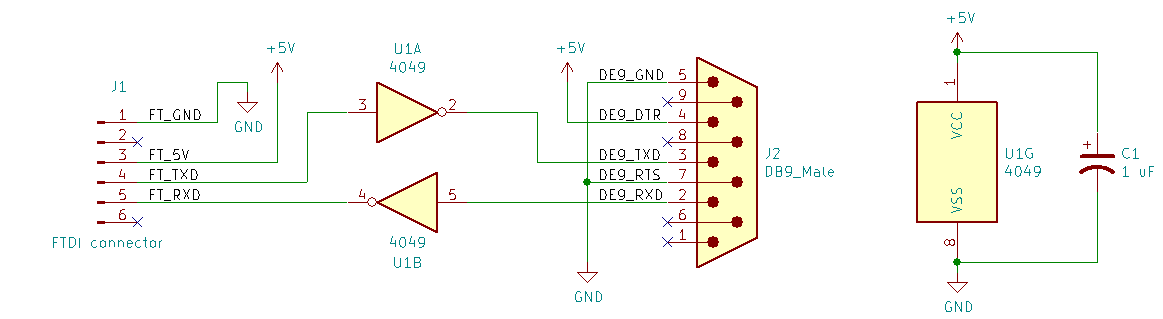
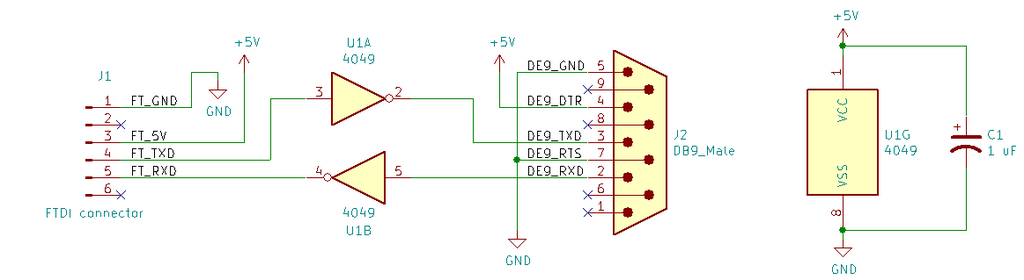
Correct, it's the Keyestudio one which I think is pretty much a bare FT232RL. 5 V for idle, 0 V for active. Flipping those around to 0 V idle and 5 V active with the inverter seems close enough for the tower. Enjoy your trip!
-
Hi @Toastie, happy to share a thrown together schematic. It's pretty simple, an inverter on RX and TX and a lot of other stuff tied to +5V or ground.
-
Hello again all, I had a bit more of a play. The tower doesn't seem to need +/- 12V levels to work. Measuring voltages on the USB to serial cable I was using earlier with no tower connected, TX and RTS were at -6.31 V, and DTR was at +7.01 V. It also seems OK with 0 and 5 V. I now have a USB to serial adapter like this one talking to the Cybermaster from my Windows 7 laptop: https://www.keyestudio.com/products/ftdi-basic-program-downloader-usb-switch-ttl-ft232-with-the-fcc-certification-for-arduino The tower does need a bit of extra electronics to work with that simple adapter though - the RX and TX levels need to be inverted. To do that, I've used a 4049 hex inverter on a breadboard. The RTS and DTR pins don't need to change - those set the levels of the RX pin coming back into the PC. With RTS at 0 V and DTR at 5 V, the levels into the 4049 are good enough. I tied RTS to ground and DTR to 5 V from the USB to serial converter. BricxCC happily talks to the brick with that wiring. (I would guess Lego used RTS and DTR this way to avoid needing to generate a voltage other than 5 V inside the tower? This way the PC that is receiving the data can set the voltage levels it wants to get?) The brick doesn't respond without some initialisation - all it reacts to is ping (0x10). Sending the UnlockFirmware LASM instruction (0xA5, followed by "Do you byte, when I knock?") gets it responding to other commands - 51 05 for a beep. NQC's source code was helpful here, especially around lines 209 to 217 of RCX_Link.cpp, which calls a function at line 453 of RCX_Cmd.cpp to get the unlock code. The full packet to send for UnlockFirmware is FE 00 00 FF AD 52 44 BB 6F 90 20 DF 79 86 6F 90 75 8A 20 DF 62 9D 79 86 74 8B 65 9A 2C D3 20 DF 77 88 68 97 65 9A 6E 91 20 DF 49 B6 20 DF 6B 94 6E 91 6F 90 63 9C 6B 94 3F C0 8D 72 (Or A5 rather than AD - it doesn't seem to matter). Did you manage to try with the new cable @Chris Hocking? (And that video by @BatteryPoweredBricks has been very helpful for fixing up many wires. If only light sensors were easier to open!)
-
It might be worth trying another USB to RS232 adapter, they are all a bit different! From playing with old bus destination controllers, the issue is not always the voltage, but also how the adapter goes about sending data. Some will queue up a few bytes to send on the PC side, then send in one USB transfer - that can cause odd delays that upset some devices. Then there's the way they receive, and again if they wait to have a few bytes before transferring things up the USB cable. A bit more playing with my Windows XP laptop, FT232 cable and Cybermaster tonight. I used Portmon to record as BricxCC opened the port and sent two notes to the Cybermaster to play - hopefully this inserted properly: 2 0.03646972 BricxCC.exe IRP_MJ_CREATE VCP0 SUCCESS Options: Open 3 0.00000447 BricxCC.exe IOCTL_SERIAL_GET_BAUD_RATE VCP0 SUCCESS 4 0.00000307 BricxCC.exe IOCTL_SERIAL_GET_LINE_CONTROL VCP0 SUCCESS 5 0.00000251 BricxCC.exe IOCTL_SERIAL_GET_CHARS VCP0 SUCCESS 6 0.00000279 BricxCC.exe IOCTL_SERIAL_GET_HANDFLOW VCP0 SUCCESS 7 0.00000279 BricxCC.exe IOCTL_SERIAL_GET_BAUD_RATE VCP0 SUCCESS 8 0.00000251 BricxCC.exe IOCTL_SERIAL_GET_LINE_CONTROL VCP0 SUCCESS 9 0.00000251 BricxCC.exe IOCTL_SERIAL_GET_CHARS VCP0 SUCCESS 10 0.00000223 BricxCC.exe IOCTL_SERIAL_GET_HANDFLOW VCP0 SUCCESS 11 0.00176670 BricxCC.exe IOCTL_SERIAL_SET_BAUD_RATE VCP0 SUCCESS Rate: 2400 12 0.00198237 BricxCC.exe IOCTL_SERIAL_CLR_RTS VCP0 SUCCESS 13 0.00197399 BricxCC.exe IOCTL_SERIAL_SET_DTR VCP0 SUCCESS 14 0.00198377 BricxCC.exe IOCTL_SERIAL_SET_LINE_CONTROL VCP0 SUCCESS StopBits: 1 Parity: NONE WordLength: 8 15 0.00000307 BricxCC.exe IOCTL_SERIAL_SET_CHAR VCP0 SUCCESS EOF:0 ERR:0 BRK:0 EVT:0 XON:1 XOFF:2 16 0.00193907 BricxCC.exe IOCTL_SERIAL_SET_HANDFLOW VCP0 SUCCESS Shake:1 Replace:0 XonLimit:100 XoffLimit:100 17 0.00000251 BricxCC.exe IOCTL_SERIAL_GET_BAUD_RATE VCP0 SUCCESS 18 0.00000223 BricxCC.exe IOCTL_SERIAL_GET_LINE_CONTROL VCP0 SUCCESS 19 0.00000223 BricxCC.exe IOCTL_SERIAL_GET_CHARS VCP0 SUCCESS 20 0.00000279 BricxCC.exe IOCTL_SERIAL_GET_HANDFLOW VCP0 SUCCESS 21 0.00000251 BricxCC.exe IOCTL_SERIAL_GET_BAUD_RATE VCP0 SUCCESS 22 0.00000223 BricxCC.exe IOCTL_SERIAL_GET_LINE_CONTROL VCP0 SUCCESS 23 0.00000251 BricxCC.exe IOCTL_SERIAL_GET_CHARS VCP0 SUCCESS 24 0.00000279 BricxCC.exe IOCTL_SERIAL_GET_HANDFLOW VCP0 SUCCESS 25 0.00180917 BricxCC.exe IOCTL_SERIAL_SET_BAUD_RATE VCP0 SUCCESS Rate: 2400 26 0.00197539 BricxCC.exe IOCTL_SERIAL_CLR_RTS VCP0 SUCCESS 27 0.00197120 BricxCC.exe IOCTL_SERIAL_SET_DTR VCP0 SUCCESS 28 0.00197288 BricxCC.exe IOCTL_SERIAL_SET_LINE_CONTROL VCP0 SUCCESS StopBits: 1 Parity: ODD WordLength: 8 29 0.00000279 BricxCC.exe IOCTL_SERIAL_SET_CHAR VCP0 SUCCESS EOF:0 ERR:0 BRK:0 EVT:0 XON:1 XOFF:2 30 0.00196282 BricxCC.exe IOCTL_SERIAL_SET_HANDFLOW VCP0 SUCCESS Shake:1 Replace:0 XonLimit:100 XoffLimit:100 31 0.00197483 BricxCC.exe IOCTL_SERIAL_SET_DTR VCP0 SUCCESS 32 0.00199020 BricxCC.exe IOCTL_SERIAL_CLR_RTS VCP0 SUCCESS 33 0.00000559 BricxCC.exe IOCTL_SERIAL_SET_TIMEOUTS VCP0 SUCCESS RI:-1 RM:0 RC:0 WM:0 WC:0 34 0.00000670 BricxCC.exe IRP_MJ_READ VCP0 SUCCESS Length 0: 35 0.00098923 BricxCC.exe IRP_MJ_WRITE VCP0 SUCCESS Length 8: FE 00 00 FF 10 EF 10 EF 36 0.00000391 BricxCC.exe IRP_MJ_FLUSH_BUFFERS VCP0 SUCCESS 37 0.00000307 BricxCC.exe IOCTL_SERIAL_SET_TIMEOUTS VCP0 SUCCESS RI:0 RM:0 RC:400 WM:0 WC:0 38 0.40016566 BricxCC.exe IRP_MJ_READ VCP0 TIMEOUT Length 5: FF EF 10 EF 10 39 0.00000615 BricxCC.exe IRP_MJ_CLEANUP VCP0 SUCCESS 40 0.10638335 BricxCC.exe IRP_MJ_CLOSE VCP0 SUCCESS 41 0.03720277 BricxCC.exe IRP_MJ_CREATE VCP0 SUCCESS Options: Open 42 0.00000475 BricxCC.exe IOCTL_SERIAL_GET_BAUD_RATE VCP0 SUCCESS 43 0.00000307 BricxCC.exe IOCTL_SERIAL_GET_LINE_CONTROL VCP0 SUCCESS 44 0.00000279 BricxCC.exe IOCTL_SERIAL_GET_CHARS VCP0 SUCCESS 45 0.00000223 BricxCC.exe IOCTL_SERIAL_GET_HANDFLOW VCP0 SUCCESS 46 0.00000251 BricxCC.exe IOCTL_SERIAL_GET_BAUD_RATE VCP0 SUCCESS 47 0.00000251 BricxCC.exe IOCTL_SERIAL_GET_LINE_CONTROL VCP0 SUCCESS 48 0.00000251 BricxCC.exe IOCTL_SERIAL_GET_CHARS VCP0 SUCCESS 49 0.00000251 BricxCC.exe IOCTL_SERIAL_GET_HANDFLOW VCP0 SUCCESS 50 0.00179492 BricxCC.exe IOCTL_SERIAL_SET_BAUD_RATE VCP0 SUCCESS Rate: 2400 51 0.00197539 BricxCC.exe IOCTL_SERIAL_CLR_RTS VCP0 SUCCESS 52 0.00197539 BricxCC.exe IOCTL_SERIAL_SET_DTR VCP0 SUCCESS 53 0.00195891 BricxCC.exe IOCTL_SERIAL_SET_LINE_CONTROL VCP0 SUCCESS StopBits: 1 Parity: NONE WordLength: 8 54 0.00000307 BricxCC.exe IOCTL_SERIAL_SET_CHAR VCP0 SUCCESS EOF:0 ERR:0 BRK:0 EVT:0 XON:1 XOFF:2 55 0.00196142 BricxCC.exe IOCTL_SERIAL_SET_HANDFLOW VCP0 SUCCESS Shake:1 Replace:0 XonLimit:100 XoffLimit:100 56 0.00000251 BricxCC.exe IOCTL_SERIAL_GET_BAUD_RATE VCP0 SUCCESS 57 0.00000279 BricxCC.exe IOCTL_SERIAL_GET_LINE_CONTROL VCP0 SUCCESS 58 0.00000251 BricxCC.exe IOCTL_SERIAL_GET_CHARS VCP0 SUCCESS 59 0.00000279 BricxCC.exe IOCTL_SERIAL_GET_HANDFLOW VCP0 SUCCESS 60 0.00000279 BricxCC.exe IOCTL_SERIAL_GET_BAUD_RATE VCP0 SUCCESS 61 0.00000223 BricxCC.exe IOCTL_SERIAL_GET_LINE_CONTROL VCP0 SUCCESS 62 0.00000223 BricxCC.exe IOCTL_SERIAL_GET_CHARS VCP0 SUCCESS 63 0.00000251 BricxCC.exe IOCTL_SERIAL_GET_HANDFLOW VCP0 SUCCESS 64 0.00181308 BricxCC.exe IOCTL_SERIAL_SET_BAUD_RATE VCP0 SUCCESS Rate: 2400 65 0.00197846 BricxCC.exe IOCTL_SERIAL_CLR_RTS VCP0 SUCCESS 66 0.00199104 BricxCC.exe IOCTL_SERIAL_SET_DTR VCP0 SUCCESS 67 0.00197707 BricxCC.exe IOCTL_SERIAL_SET_LINE_CONTROL VCP0 SUCCESS StopBits: 1 Parity: ODD WordLength: 8 68 0.00000279 BricxCC.exe IOCTL_SERIAL_SET_CHAR VCP0 SUCCESS EOF:0 ERR:0 BRK:0 EVT:0 XON:1 XOFF:2 69 0.00195863 BricxCC.exe IOCTL_SERIAL_SET_HANDFLOW VCP0 SUCCESS Shake:1 Replace:0 XonLimit:100 XoffLimit:100 70 0.00196869 BricxCC.exe IOCTL_SERIAL_SET_DTR VCP0 SUCCESS 71 0.00196338 BricxCC.exe IOCTL_SERIAL_CLR_RTS VCP0 SUCCESS 72 0.00000335 BricxCC.exe IOCTL_SERIAL_SET_TIMEOUTS VCP0 SUCCESS RI:-1 RM:0 RC:0 WM:0 WC:0 73 0.00000559 BricxCC.exe IRP_MJ_READ VCP0 SUCCESS Length 0: 74 0.00092889 BricxCC.exe IRP_MJ_WRITE VCP0 SUCCESS Length 8: FE 00 00 FF 18 E7 18 E7 75 0.00000307 BricxCC.exe IRP_MJ_FLUSH_BUFFERS VCP0 SUCCESS 76 0.00000279 BricxCC.exe IOCTL_SERIAL_SET_TIMEOUTS VCP0 SUCCESS RI:0 RM:0 RC:400 WM:0 WC:0 77 0.39955637 BricxCC.exe IRP_MJ_READ VCP0 TIMEOUT Length 5: FF E7 18 E7 18 78 0.00000503 BricxCC.exe IOCTL_SERIAL_SET_TIMEOUTS VCP0 SUCCESS RI:-1 RM:0 RC:0 WM:0 WC:0 79 0.00000531 BricxCC.exe IRP_MJ_READ VCP0 SUCCESS Length 0: 80 0.00025841 BricxCC.exe IRP_MJ_WRITE VCP0 SUCCESS Length 60: FE 00 00 FF A5 5A 44 BB 6F 90 20 DF 79 86 6F 90 75 8A 20 DF 62 81 0.00000335 BricxCC.exe IRP_MJ_FLUSH_BUFFERS VCP0 SUCCESS 82 0.00000251 BricxCC.exe IOCTL_SERIAL_SET_TIMEOUTS VCP0 SUCCESS RI:0 RM:0 RC:400 WM:0 WC:0 83 0.39992904 BricxCC.exe IRP_MJ_READ VCP0 TIMEOUT Length 22: FF 5A A5 4A B5 75 8A 73 8C 74 8B 20 DF 61 9E 20 DF 62 9D 69 96 84 0.00000531 BricxCC.exe IOCTL_SERIAL_SET_TIMEOUTS VCP0 SUCCESS RI:0 RM:0 RC:200 WM:0 WC:0 85 0.20010085 BricxCC.exe IRP_MJ_READ VCP0 TIMEOUT Length 33: 8B 20 DF 6F 90 66 99 66 99 20 DF 74 8B 68 97 65 9A 20 DF 62 9D 86 0.00000559 BricxCC.exe IOCTL_SERIAL_SET_TIMEOUTS VCP0 SUCCESS RI:-1 RM:0 RC:0 WM:0 WC:0 87 0.00000559 BricxCC.exe IRP_MJ_READ VCP0 SUCCESS Length 0: 88 0.00060538 BricxCC.exe IRP_MJ_WRITE VCP0 SUCCESS Length 8: FE 00 00 FF 10 EF 10 EF 89 0.00000307 BricxCC.exe IRP_MJ_FLUSH_BUFFERS VCP0 SUCCESS 90 0.00000279 BricxCC.exe IOCTL_SERIAL_SET_TIMEOUTS VCP0 SUCCESS RI:0 RM:0 RC:400 WM:0 WC:0 91 0.39954715 BricxCC.exe IRP_MJ_READ VCP0 TIMEOUT Length 5: FF EF 10 EF 10 92 0.00000503 BricxCC.exe IOCTL_SERIAL_SET_TIMEOUTS VCP0 SUCCESS RI:-1 RM:0 RC:0 WM:0 WC:0 93 0.00000559 BricxCC.exe IRP_MJ_READ VCP0 SUCCESS Length 0: 94 0.00089592 BricxCC.exe IRP_MJ_WRITE VCP0 SUCCESS Length 8: FE 00 00 FF 18 E7 18 E7 95 0.00000475 BricxCC.exe IRP_MJ_FLUSH_BUFFERS VCP0 SUCCESS 96 0.00000363 BricxCC.exe IOCTL_SERIAL_SET_TIMEOUTS VCP0 SUCCESS RI:0 RM:0 RC:400 WM:0 WC:0 97 0.39987987 BricxCC.exe IRP_MJ_READ VCP0 TIMEOUT Length 5: FF E7 18 E7 18 98 0.00000559 BricxCC.exe IOCTL_SERIAL_SET_TIMEOUTS VCP0 SUCCESS RI:-1 RM:0 RC:0 WM:0 WC:0 99 0.00000587 BricxCC.exe IRP_MJ_READ VCP0 SUCCESS Length 0: 100 0.00080541 BricxCC.exe IRP_MJ_WRITE VCP0 SUCCESS Length 8: FE 00 00 FF 10 EF 10 EF 101 0.00000335 BricxCC.exe IRP_MJ_FLUSH_BUFFERS VCP0 SUCCESS 102 0.00000335 BricxCC.exe IOCTL_SERIAL_SET_TIMEOUTS VCP0 SUCCESS RI:0 RM:0 RC:400 WM:0 WC:0 103 0.40025506 BricxCC.exe IRP_MJ_READ VCP0 TIMEOUT Length 5: FF EF 10 EF 10 104 0.00000587 BricxCC.exe IOCTL_SERIAL_SET_TIMEOUTS VCP0 SUCCESS RI:-1 RM:0 RC:0 WM:0 WC:0 105 0.00000615 BricxCC.exe IRP_MJ_READ VCP0 SUCCESS Length 0: 106 0.00104008 BricxCC.exe IRP_MJ_WRITE VCP0 SUCCESS Length 14: FE 00 00 FF 23 DC 88 77 01 FE 28 D7 D4 2B 107 0.00000307 BricxCC.exe IRP_MJ_FLUSH_BUFFERS VCP0 SUCCESS 108 0.00000307 BricxCC.exe IOCTL_SERIAL_SET_TIMEOUTS VCP0 SUCCESS RI:0 RM:0 RC:400 WM:0 WC:0 109 0.39988043 BricxCC.exe IRP_MJ_READ VCP0 TIMEOUT Length 5: FF DC 23 DC 23 110 0.00000587 BricxCC.exe IOCTL_SERIAL_SET_TIMEOUTS VCP0 SUCCESS RI:-1 RM:0 RC:0 WM:0 WC:0 111 0.00000643 BricxCC.exe IRP_MJ_READ VCP0 SUCCESS Length 0: 112 0.00012851 BricxCC.exe IRP_MJ_WRITE VCP0 SUCCESS Length 14: FE 00 00 FF 2B D4 B8 47 01 FE 28 D7 0C F3 113 0.00000363 BricxCC.exe IRP_MJ_FLUSH_BUFFERS VCP0 SUCCESS 114 0.00000335 BricxCC.exe IOCTL_SERIAL_SET_TIMEOUTS VCP0 SUCCESS RI:0 RM:0 RC:400 WM:0 WC:0 115 0.39975081 BricxCC.exe IRP_MJ_READ VCP0 TIMEOUT Length 5: FF D4 2B D4 2B I also downloaded talkrcx from here and had a play: https://web.archive.org/web/20010415171811/http://www.phesk.demon.co.uk/lego/talkqbas.htm. It took a bit to hack it to run with FreeBASIC and send the Cybermaster header, but it did get some noises out of the Cybermaster. Sending the sound opcodes from the RCX2 LASM byte codes in the RCX2 SDK worked well. Opcode 51/59 is the PlaySystemSound instruction and takes a parameter between 0 and 5, corresponding to RCX tones 1 to 6. The Cybermaster has the same tones. Sending FE 00 00 FF 59 A6 05 FA 5E A1 got sound 6 from the Cybermaster. Playing a certain tone also worked using PlayTone, which is 23/2B followed by the low byte for frequency, the high byte for frequency, and a byte for duration. An example: FE 00 00 FF 23 DC 88 77 01 FE 28 D7 D4 2B A couple of thoughts on your code. One is that the RCX and seemingly the Cybermaster needs the the 0x08 bit of the command to toggle between instructions - it won't follow two instructions in a row that have the same value in the bit representing 8. So sending 23 then 51 would not work, but sending 23 then 59 would. After 59, the next instruction could be either 51 or 23, followed by 59 or 2B. Hopefully not a tricky change to make. Also, from memory, UnlockFirmware is used at the end of the firmware download on an RCX to boot the firmware - not sure if the Cybermaster has that one? Sound commands are always my favourite for testing because they are generally not too complicated, and you can tell quickly if it worked. Sometimes BricxCC won't connect properly for me either, turning the Cybermaster off and on again helps eventually. All the best with finding a well behaved USB to serial cable! Always a challenge getting these things to talk to modern hardware, but cracking that is part of the fun.
-
Hi Chris, Interesting to see another person in Australia playing with these old things, saw this discussion and had to quit lurking on Eurobricks since 2015 and join in! The other day I came across some interesting information by searching for the FCC ID of the Cybermaster unit. Searching on Google for FCC 71797 will get you some good stuff on the Cybermaster unit. (Which seems to have been called "Spirit" during development - is that where SPIRIT.OCX came from?) Likewise, taking the Bricklink element ID for the tower, 71846, and searching FCC 71846 brings up a page on fcc.io which has a schematic and a description of operation for the tower. That shows the header as FE 00 00 FF for the Cybermaster, not the 55 FF 00 used for IR in the RCX and similar. It explains that the tower checks for the FE to ensure the baud rate is correct (2400 bps), and won't power up the radio circuitry unless it gets the FE. I'm using an FT232 USB to serial converter cable on an old Windows 7 machine. BricxCC was able to sometimes connect with the default settings. I needed to set the Receive and Transmit buffer sizes to the lowest value (64) and the Latency Timer to the lowest setting of 1 ms to get BricxCC to reliably communicate. What are the motors on your unit like? Mine had one with a dislodged magnet that needed to be pushed back in with a vice, and one with a disintegrating magnet that I replaced with one from a working 71427 motor. It's happily running around the floor now and avoiding obstacles.