


Chris Hocking
-
Posts
16 -
Joined
-
Last visited
About Chris Hocking

-
 Sorry for the lack of contact - things got busy! I did end up getting a new RS232 adapter, but I haven't actually had a chance to try it out yet. Will give it another shot soon, and let you know!
 -
Thanks! I've ordered the DriverGenius USB232A-E-C | 1-Port USB-C to Serial / RS232 (DB9) Adapter – for PLC Programming, Data Collection, Embedded Systems | Compatible with Windows 11, macOS 15 - so will see how that goes when it arrives.
-
I tried BricxCC test_release20120724 on Windows 11 Home (24H2). I tried using COM3 and COM4 (one of my USB to RS232 adapters has two ports). I tried adjusting the settings as per HughC's suggestions too. There was communication happening - both the transmitter and receiver were flashing away - which is something I've never seen before on my Mac.
-
Legend, thanks for the update! As per a previous post, I did try my Cybermaster on a PC, and whilst there was communication happening (i.e. lights flashing on the receiver) I couldn't get it to connect. I tried messing with lots of settings, and I wasn't able to get it working. However, I'll try again at some point - and also try and hunt down the original Lego software to try that too.
-
I'll also try get my hands on another/better RS232 adapter and see what I can uncover.
-
I believe the PC is running Windows 11 Home (24H2). I tried using COM3 and COM4 (one of my USB to RS232 adapters has two ports). I tried adjusting the settings as per HughC's suggestions too. There was communication happening - both the transmitter and receiver were flashing away - which is something I've never seen before on my Mac. Maybe I just need to find another USB to RS232 adapter that definitely outputs RS232 levels?
-
I tried BricxCC test_release20120724 on a Windows PC using the same USB to RS232 and I just get "Cannot find brick. Switch it on or move it closer and press OK". However, I CAN see the status light on the receiver flashing away, so some communication is actually happening - which is something I haven't been able to make it do on my Mac using Swift. So baby steps... but still not working.
-
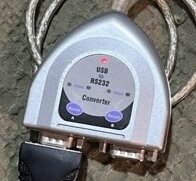
Amazing - thanks for all your ideas and comments Toastie, HughC and BrickTronic! I did feed BrickTronic's schematic into ChatGPT and it told me that: So whilst I can confirm that my code is definitely sending "stuff" to the transmitter, it doesn't necessarily mean that data is being transmitted. HughC - I haven't been able to actually get the motors working at all yet - so I have no idea if they still work or not, haha. I updated my code to: /// Tower-level encoding: preamble, byte complements, checksum func encodeForTower(_ bytes: [UInt8]) -> [UInt8] { //var encoded: [UInt8] = [0x55, 0xFF, 0x00] // 3-byte preamble for RCX/Scout IR var encoded: [UInt8] = [0xFE, 0x00, 0x00, 0xFF] // Cybermaster RF var sum: UInt16 = 0 for b in bytes { encoded.append(b) encoded.append(0xFF &- b) sum = (sum + UInt16(b)) & 0xFF } // LEGO checksum: sum of data bytes mod 256, then its complement let checksum = UInt8(sum & 0xFF) encoded.append(checksum) encoded.append(0xFF &- checksum) return encoded } However, it still doesn't work: Port opened on channel 0 Received: {length = 1, bytes = 0x00} Received: {length = 1, bytes = 0x00} → FE 00 00 FF 02 FD 05 FA 41 BE 02 FD 00 FF 20 DF 66 99 03 FC D3 2C → PBAlive sent → FE 00 00 FF 02 FD 1F E0 41 BE 02 FD 00 FF A5 5A 44 BB 6F 90 20 DF 79 86 6F 90 75 8A 20 DF 62 9D 79 86 74 8B 65 9A 2C D3 20 DF 77 88 68 97 65 9A 6E 91 20 DF 49 B6 20 DF 6B 94 6E 91 6F 90 63 9C 6B 94 3F C0 B7 48 03 FC A3 5C → UnlockFirmware sent on channel 0 → FE 00 00 FF 02 FD 06 F9 41 BE 02 FD 00 FF 50 AF 00 FF 15 EA 03 FC B3 4C → FE 00 00 FF 02 FD 06 F9 41 BE 02 FD 00 FF 50 AF 00 FF 15 EA 03 FC B3 4C Port closed on channel 0 Port opened on channel 1 Received: {length = 1, bytes = 0x00} Received: {length = 1, bytes = 0x00} → FE 00 00 FF 02 FD 05 FA 41 BE 02 FD 01 FE 20 DF 67 98 03 FC D5 2A → PBAlive sent → FE 00 00 FF 02 FD 1F E0 41 BE 02 FD 01 FE A5 5A 44 BB 6F 90 20 DF 79 86 6F 90 75 8A 20 DF 62 9D 79 86 74 8B 65 9A 2C D3 20 DF 77 88 68 97 65 9A 6E 91 20 DF 49 B6 20 DF 6B 94 6E 91 6F 90 63 9C 6B 94 3F C0 B6 49 03 FC A3 5C → UnlockFirmware sent on channel 1 → FE 00 00 FF 02 FD 06 F9 41 BE 02 FD 01 FE 21 DE 7F 80 1A E5 03 FC 09 F6 → FE 00 00 FF 02 FD 06 F9 41 BE 02 FD 01 FE 29 D6 81 7E EC 13 03 FC E5 1A → FE 00 00 FF 02 FD 06 F9 41 BE 02 FD 01 FE 22 DD 7F 80 19 E6 03 FC 09 F6 → FE 00 00 FF 02 FD 06 F9 41 BE 02 FD 01 FE 2A D5 81 7E EF 10 03 FC E9 16 → FE 00 00 FF 02 FD 06 F9 41 BE 02 FD 01 FE 23 DC 7F 80 18 E7 03 FC 09 F6 → FE 00 00 FF 02 FD 06 F9 41 BE 02 FD 01 FE 2B D4 81 7E EE 11 03 FC E9 16 → FE 00 00 FF 02 FD 06 F9 41 BE 02 FD 01 FE 50 AF 00 FF 14 EB 03 FC B3 4C Port closed on channel 1 Port opened on channel 2 Received: {length = 1, bytes = 0x00} Received: {length = 1, bytes = 0x00} → FE 00 00 FF 02 FD 05 FA 41 BE 02 FD 02 FD 20 DF 64 9B 03 FC D3 2C → PBAlive sent → FE 00 00 FF 02 FD 1F E0 41 BE 02 FD 02 FD A5 5A 44 BB 6F 90 20 DF 79 86 6F 90 75 8A 20 DF 62 9D 79 86 74 8B 65 9A 2C D3 20 DF 77 88 68 97 65 9A 6E 91 20 DF 49 B6 20 DF 6B 94 6E 91 6F 90 63 9C 6B 94 3F C0 B5 4A 03 FC A3 5C → UnlockFirmware sent on channel 2 → FE 00 00 FF 02 FD 06 F9 41 BE 02 FD 02 FD 21 DE 7F 80 19 E6 03 FC 09 F6 → FE 00 00 FF 02 FD 06 F9 41 BE 02 FD 02 FD 29 D6 7F 80 11 EE 03 FC 09 F6 → FE 00 00 FF 02 FD 06 F9 41 BE 02 FD 02 FD 50 AF 00 FF 17 E8 03 FC B7 48 → FE 00 00 FF 02 FD 06 F9 41 BE 02 FD 02 FD 22 DD 7F 80 1A E5 03 FC 0B F4 → FE 00 00 FF 02 FD 06 F9 41 BE 02 FD 02 FD 23 DC 7F 80 1B E4 03 FC 0D F2 Port closed on channel 2 Port opened on channel 3 Received: {length = 1, bytes = 0x00} Received: {length = 1, bytes = 0x00} → FE 00 00 FF 02 FD 05 FA 41 BE 02 FD 03 FC 20 DF 65 9A 03 FC D5 2A → PBAlive sent → FE 00 00 FF 02 FD 1F E0 41 BE 02 FD 03 FC A5 5A 44 BB 6F 90 20 DF 79 86 6F 90 75 8A 20 DF 62 9D 79 86 74 8B 65 9A 2C D3 20 DF 77 88 68 97 65 9A 6E 91 20 DF 49 B6 20 DF 6B 94 6E 91 6F 90 63 9C 6B 94 3F C0 B4 4B 03 FC A3 5C → UnlockFirmware sent on channel 3 → FE 00 00 FF 02 FD 06 F9 41 BE 02 FD 03 FC 21 DE 7F 80 18 E7 03 FC 09 F6 → FE 00 00 FF 02 FD 06 F9 41 BE 02 FD 03 FC 23 DC 7F 80 1A E5 03 FC 0D F2 → FE 00 00 FF 02 FD 06 F9 41 BE 02 FD 03 FC 50 AF 00 FF 16 E9 03 FC B7 48 Port closed on channel 3 I'll keep tinkering... My USB to RS232 adapter looks like this:
-
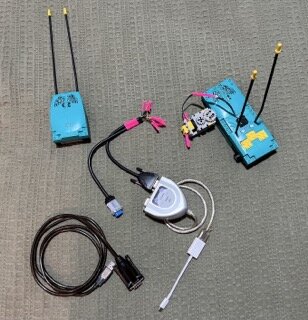
Thanks for this information Jo! To be honest, I'm not sure... I've tried two seperate USB to serial adapters (photo attached): USB-Serial Controller : Product ID: 0x23a3 Vendor ID: 0x067b (Prolific Technology, Inc.) Version: 6.05 Serial Number: CVDYf146B11 Speed: Up to 12 Mb/s Manufacturer: Prolific Technology Inc. Location ID: 0x00100000 / 1 Current Available (mA): 500 Current Required (mA): 100 Extra Operating Current (mA): 0 USB HS Serial Converter: Product ID: 0x6001 Vendor ID: 0x0403 (Future Technology Devices International Limited) Version: 4.00 Serial Number: FTC87U6C Speed: Up to 12 Mb/s Manufacturer: FTDI Location ID: 0x00120000 / 3 Current Available (mA): 500 Current Required (mA): 44 Extra Operating Current (mA): 0 I'm using the following settings: guard let port = selectedPort else { return } port.baudRate = 2400 port.numberOfDataBits = 8 port.numberOfStopBits = 1 port.parity = .odd port.usesRTSCTSFlowControl = false port.usesDTRDSRFlowControl = false port.dtr = true port.rts = true port.delegate = self port.open() I don't have a multimeter with me, so I haven't measured the voltage coming off the pins. Given one of the adapters specifically says it's an RS-232 adapter though, I'm ASSUMING its standard voltages. I assume USB to serial adapters work similar to old-school serial ports on PC's?
-
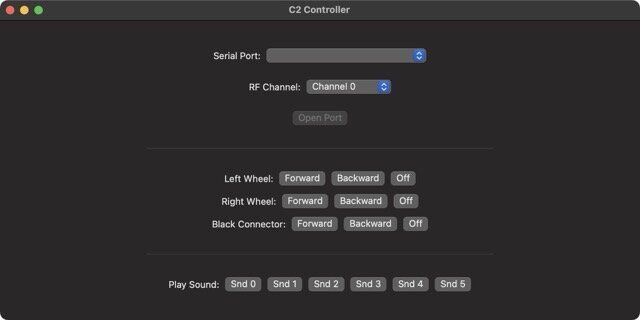
Thanks for your reply Thorsten! It's entirely possible all the messages I'm generating in Swift are totally wrong, haha. It's also entirely possible I'm over complicating things - or mixing up CyberMaster code with other Lego product code. Hopefully an easy question for you... For CyberMaster, do you actually need to do the "Do you byte, when I knock?" dance? I was actually thinking that I WAS sending direct codes. Maybe I'm completely misunderstanding something. For reference, attached is what the user interface currently looks like. I was EXPECTING that pressing the Forward button for the left wheel, for example, would be sending a direct command. And no - so far I haven't been able to make the receiver do ANYTHING. If I could make it beep, that would be amazing. According to ChatGPT, it seems to think the code is right - it's the power levels from the USB to serial adapter that are the issue, but given your comments, I think it's more likely that the messages I'm outputting via the serial port is nonsense. I'll keep tinkering... but if you have any ideas or suggestions, let me know! In a perfect world, I'd love to know what bytes I need to send to just make it beep. Thanks heaps!
-
Note to self... I tried changing to: func unlockCyberMasterFirmware(channel: UInt8) -> [UInt8] { let linkType: UInt8 = 0x02 let unlockOpcode: UInt8 = 0xA5 // The magic unlock string as per LEGO docs: let unlockString = Array("Do you byte, when I knock?".utf8) let data: [UInt8] = [linkType, channel, unlockOpcode] + unlockString return cyberMasterPacket(cmd: 0x41, data: data) } ...but still nothing.
-
Note to self... I've tweaked the code, but still not getting any response on the receiver. Port opened on channel 0 Received: {length = 1, bytes = 0x00} Received: {length = 1, bytes = 0x00} → 55 FF 00 02 FD 05 FA 41 BE 02 FD 00 FF 20 DF 66 99 03 FC D3 2C → PBAlive sent → 55 FF 00 02 FD 05 FA 41 BE 02 FD 00 FF A5 5A E3 1C 03 FC D5 2A → UnlockFirmware sent on channel 0 → 55 FF 00 02 FD 06 F9 41 BE 02 FD 00 FF 21 DE 7F 80 1B E4 03 FC 09 F6 → 55 FF 00 02 FD 06 F9 41 BE 02 FD 00 FF 29 D6 7F 80 13 EC 03 FC 09 F6 → 55 FF 00 02 FD 06 F9 41 BE 02 FD 00 FF 50 AF 00 FF 15 EA 03 FC B3 4C Port closed on channel 0 Port opened on channel 1 Received: {length = 1, bytes = 0x00} Received: {length = 1, bytes = 0x00} → 55 FF 00 02 FD 05 FA 41 BE 02 FD 01 FE 20 DF 67 98 03 FC D5 2A → PBAlive sent → 55 FF 00 02 FD 05 FA 41 BE 02 FD 01 FE A5 5A E2 1D 03 FC D5 2A → UnlockFirmware sent on channel 1 → 55 FF 00 02 FD 06 F9 41 BE 02 FD 01 FE 29 D6 7F 80 12 ED 03 FC 09 F6 → 55 FF 00 02 FD 06 F9 41 BE 02 FD 01 FE 22 DD 7F 80 19 E6 03 FC 09 F6 → 55 FF 00 02 FD 06 F9 41 BE 02 FD 01 FE 50 AF 00 FF 14 EB 03 FC B3 4C Port closed on channel 1 Port opened on channel 2 Received: {length = 1, bytes = 0x00} Received: {length = 1, bytes = 0x00} → 55 FF 00 02 FD 05 FA 41 BE 02 FD 02 FD 20 DF 64 9B 03 FC D3 2C → PBAlive sent → 55 FF 00 02 FD 05 FA 41 BE 02 FD 02 FD A5 5A E1 1E 03 FC D5 2A → UnlockFirmware sent on channel 2 → 55 FF 00 02 FD 06 F9 41 BE 02 FD 02 FD 21 DE 7F 80 19 E6 03 FC 09 F6 → 55 FF 00 02 FD 06 F9 41 BE 02 FD 02 FD 22 DD 7F 80 1A E5 03 FC 0B F4 → 55 FF 00 02 FD 06 F9 41 BE 02 FD 02 FD 23 DC 7F 80 1B E4 03 FC 0D F2 → 55 FF 00 02 FD 06 F9 41 BE 02 FD 02 FD 50 AF 00 FF 17 E8 03 FC B7 48 Port closed on channel 2 Port opened on channel 3 Received: {length = 1, bytes = 0x00} Received: {length = 1, bytes = 0x00} → 55 FF 00 02 FD 05 FA 41 BE 02 FD 03 FC 20 DF 65 9A 03 FC D5 2A → PBAlive sent → 55 FF 00 02 FD 05 FA 41 BE 02 FD 03 FC A5 5A E0 1F 03 FC D5 2A → UnlockFirmware sent on channel 3 → 55 FF 00 02 FD 06 F9 41 BE 02 FD 03 FC 21 DE 7F 80 18 E7 03 FC 09 F6 → 55 FF 00 02 FD 06 F9 41 BE 02 FD 03 FC 22 DD 7F 80 1B E4 03 FC 0D F2 → 55 FF 00 02 FD 06 F9 41 BE 02 FD 03 FC 23 DC 7F 80 1A E5 03 FC 0D F2 → 55 FF 00 02 FD 06 F9 41 BE 02 FD 03 FC 50 AF 00 FF 16 E9 03 FC B7 48 Port closed on channel 3 My current code is: import Foundation import ORSSerial final class SerialManager: NSObject, ObservableObject, ORSSerialPortDelegate { @Published var availablePorts: [ORSSerialPort] = [] @Published var selectedPort: ORSSerialPort? @Published var isOpen = false @Published var radioChannel: UInt8 = 0 // For toggle-bit handling private var lastOutputOpcode: UInt8? = nil override init() { super.init() refreshPorts() ORSSerialPortManager.shared().addObserver(self, forKeyPath: "availablePorts", options: .new, context: nil) } deinit { ORSSerialPortManager.shared().removeObserver(self, forKeyPath: "availablePorts") } override func observeValue( forKeyPath keyPath: String?, of object: Any?, change: [NSKeyValueChangeKey: Any]?, context: UnsafeMutableRawPointer? ) { if keyPath == "availablePorts" { refreshPorts() } } func refreshPorts() { availablePorts = ORSSerialPortManager.shared().availablePorts } func openPort() { // ------------------------------------------------------------------------------------------- // SOURCE: https://www.eurobricks.com/forum/forums/topic/196691-cannot-donwload-code-to-cybermaster-unit/#findComment-3658973 // // The IR/RF towers are as dumb as a rock. They don't know anything about flow control other // than having the bridge between RTS and CTS = "always ready". BricxCC/NQC don't even bother, // the LEGO software does though - the SCOUT tool for example claims there is no tower when // the corresponding pin is not pulled high. The electronics in the tower is naturally always // way faster than 9600 baud can ever be - it doesn't have to do anything other than emitting // the IR/RF serial signal coming in and vice versa. // // Not the point. But when you have xon/xoff activated, any "tower echo" or CM reply with // value 0x13 may stop the transmission, as this is the character to signal "device is busy". // For ASCII character transmission, all is fine, as these begin at 0x20 (space). All // characters below (0x00 - 0x1F = 32) are considered control codes. LEGO byte codes are // of binary nature - no control chars at all. That may be an issue when transmitting longer // sequences of bytes (a program). And then no further bytes are coming in, as the towers // don't do anything smart, as for example sending 0x11 = "ready" ... // ------------------------------------------------------------------------------------------- // ------------------------------------------------------------------------------------------- // SOURCE: https://www.eurobricks.com/forum/forums/topic/208025-reverse-engineering-lego-technic-cybermaster-c2/#findComment-3784164 // // The close to hardware protocol is 2400 baud, 8 data bits, odd parity. Null modem cable is fine. // The close to software protocol is "LEGO byte code", as used by LEGO software for the RCX, // SCOUT, Spybots, Cybermaster programmable bricks (PBricks), as well as by NQC/BricxCC. // ------------------------------------------------------------------------------------------- guard let port = selectedPort else { return } port.baudRate = 2400 port.numberOfDataBits = 8 port.numberOfStopBits = 1 port.parity = .odd port.usesRTSCTSFlowControl = false port.usesDTRDSRFlowControl = false port.dtr = true port.rts = true port.delegate = self port.open() port.rts = false port.dtr = false usleep(100000) // 100 ms port.rts = true port.dtr = true usleep(100000) } func closePort() { selectedPort?.close() } func send(_ data: Data) { guard isOpen else { return } let encoded = encodeForTower([UInt8](data)) let bytesStr = encoded.map { String(format: "%02X", $0) }.joined(separator: " ") print("→ \(bytesStr)") selectedPort?.send(Data(encoded)) } // MARK: - ORSSerialPortDelegate func serialPortWasOpened(_ serialPort: ORSSerialPort) { isOpen = true print("Port opened on channel \(self.radioChannel)") DispatchQueue.main.asyncAfter(deadline: .now() + 0.5) { self.send(Data(pbAlivePacket(channel: self.radioChannel))) print("→ PBAlive sent") DispatchQueue.main.asyncAfter(deadline: .now() + 0.5) { let unlock = unlockCyberMasterFirmware(channel: self.radioChannel) self.send(Data(unlock)) print("→ UnlockFirmware sent on channel \(self.radioChannel)") } } } func serialPortWasClosed(_ serialPort: ORSSerialPort) { isOpen = false print("Port closed on channel \(self.radioChannel)") } func serialPortWasRemovedFromSystem(_ serialPort: ORSSerialPort) { closePort() refreshPorts() } func serialPort(_ port: ORSSerialPort, didReceive data: Data) { print("Received: \(data as NSData)") } func serialPort(_ port: ORSSerialPort, didEncounterError error: Error) { print("Serial error:", error) } // MARK: - Toggle bit aware outputPacket for motors func outputPacket(channel: UInt8, output: CyberMasterOutput, direction: CyberMasterDirection) -> [UInt8] { let linkType: UInt8 = 0x02 var cmdCode = 0x21 + output.rawValue // Toggle the 0x08 bit if sending the same opcode as last time (ignoring 0x08 itself) if let last = lastOutputOpcode, (last & 0xF7) == cmdCode { cmdCode ^= 0x08 } lastOutputOpcode = cmdCode let data: [UInt8] = [linkType, channel, cmdCode, direction.rawValue] return cyberMasterPacket(cmd: 0x41, data: data) } } /// Tower-level encoding: preamble, byte complements, checksum func encodeForTower(_ bytes: [UInt8]) -> [UInt8] { var encoded: [UInt8] = [0x55, 0xFF, 0x00] // 3-byte preamble var sum: UInt16 = 0 for b in bytes { encoded.append(b) encoded.append(0xFF &- b) sum = (sum + UInt16(b)) & 0xFF } // LEGO checksum: sum of data bytes mod 256, then its complement let checksum = UInt8(sum & 0xFF) encoded.append(checksum) encoded.append(0xFF &- checksum) return encoded } /// Build a CyberMaster packet (PBrick-level) func cyberMasterPacket(cmd: UInt8, data: [UInt8]) -> [UInt8] { let stx: UInt8 = 0x02 let etx: UInt8 = 0x03 let len = UInt8(1 + data.count + 1) // CMD + data + XOR var pkt = [stx, len, cmd] + data let chk = pkt[1...].reduce(0, ^) // XOR LEN,CMD,DATA… pkt += [chk, etx] return pkt } enum CyberMasterOutput: UInt8 { case left=0, right, black } enum CyberMasterDirection: UInt8 { case forward=0x7F, backward=0x81, off=0x00 } func playSoundPacket(channel: UInt8, soundNumber: UInt8) -> [UInt8] { let linkType: UInt8 = 0x02 let data: [UInt8] = [linkType, channel, 0x50, soundNumber] return cyberMasterPacket(cmd: 0x41, data: data) } func unlockCyberMasterFirmware(channel: UInt8) -> [UInt8] { let linkType: UInt8 = 0x02 let data: [UInt8] = [linkType, channel, 0xA5] // 0xA5 = unlock command return cyberMasterPacket(cmd: 0x41, data: data) } func pbAlivePacket(channel: UInt8) -> [UInt8] { let linkType: UInt8 = 0x02 let data: [UInt8] = [linkType, channel, 0x20] // 0x20 = PBAlive return cyberMasterPacket(cmd: 0x41, data: data) }
-
Note to self... maehw writes:
-
I've tried going back to a null modem cable and now using baud rate of 2400. Alas, whilst the transmitter LED is going triggering with each command, I still get nothing on the receiver: Port opened on channel 0 Received: {length = 1, bytes = 0x00} → 02 05 41 02 00 20 66 03 → PBAlive sent Received: {length = 1, bytes = 0x00} → 02 05 41 02 00 A5 E3 03 → UnlockFirmware sent on channel 0 → 02 06 41 02 00 21 7F 1B 03 → 02 06 41 02 00 21 81 E5 03 → 02 06 41 02 00 22 7F 18 03 → 02 06 41 02 00 22 81 E6 03 → 02 06 41 02 00 23 7F 19 03 → 02 06 41 02 00 23 81 E7 03 Port closed on channel 1 Port opened on channel 1 Received: {length = 1, bytes = 0x00} → 02 05 41 02 01 20 67 03 → PBAlive sent Received: {length = 1, bytes = 0x00} → 02 05 41 02 01 A5 E2 03 → UnlockFirmware sent on channel 1 → 02 06 41 02 01 21 7F 1A 03 → 02 06 41 02 01 21 81 E4 03 → 02 06 41 02 01 22 7F 19 03 → 02 06 41 02 01 22 81 E7 03 → 02 06 41 02 01 23 7F 18 03 → 02 06 41 02 01 23 81 E6 03 Port closed on channel 1 Port opened on channel 2 Received: {length = 1, bytes = 0x00} → 02 05 41 02 02 20 64 03 → PBAlive sent Received: {length = 1, bytes = 0x00} → 02 05 41 02 02 A5 E1 03 → UnlockFirmware sent on channel 2 → 02 06 41 02 02 21 7F 19 03 → 02 06 41 02 02 21 81 E7 03 → 02 06 41 02 02 22 7F 1A 03 → 02 06 41 02 02 22 81 E4 03 → 02 06 41 02 02 23 7F 1B 03 → 02 06 41 02 02 23 81 E5 03 Port closed on channel 2 Port opened on channel 3 Received: {length = 1, bytes = 0x00} → 02 05 41 02 03 20 65 03 → PBAlive sent Received: {length = 1, bytes = 0x00} → 02 05 41 02 03 A5 E0 03 → UnlockFirmware sent on channel 3 → 02 06 41 02 03 21 7F 18 03 → 02 06 41 02 03 21 81 E6 03 → 02 06 41 02 03 22 7F 1B 03 → 02 06 41 02 03 22 81 E5 03 → 02 06 41 02 03 23 7F 1A 03 → 02 06 41 02 03 23 81 E4 03 Port closed on channel 3 Will keep tinkering, as I'm HOPING it's just a bug in the Swift code rather than something wrong with the Lego itself.
-
Thanks everyone for your replies - HUGELY appreciated! I have skimmed through most of those posts I think - I've basically read most things that "Cybermaster" returns on Google, haha. I was unsure about the cable, so I've tried both a null modem cable and re-wiring it to be a straight-through cable. When using a null modem cable, the LED on the transmitter lights up, whereas with the straight-through wiring it does now. Good to know that a null modem cable should be fine - thanks Thorsten! At home I currently only have access to a Mac, but I do have a PC in the office which I can try next week. I'll try installing Bricx Command Center (BricxCC) on the PC. I have tried two different USB to Serial adapters: USB-Serial Controller : Product ID: 0x23a3 Vendor ID: 0x067b (Prolific Technology, Inc.) Version: 6.05 Serial Number: CVDYf146B11 Speed: Up to 12 Mb/s Manufacturer: Prolific Technology Inc. Location ID: 0x00100000 / 1 Current Available (mA): 500 Current Required (mA): 100 Extra Operating Current (mA): 0 USB HS Serial Converter: Product ID: 0x6001 Vendor ID: 0x0403 (Future Technology Devices International Limited) Version: 4.00 Serial Number: FTC87U6C Speed: Up to 12 Mb/s Manufacturer: FTDI Location ID: 0x00120000 / 3 Current Available (mA): 500 Current Required (mA): 44 Extra Operating Current (mA): 0 I'm currently using these port settings in Swift code: func openPort() { guard let port = selectedPort else { return } port.baudRate = 9600 port.numberOfStopBits = 1 port.parity = .odd port.numberOfDataBits = 8 port.usesRTSCTSFlowControl = false port.usesDTRDSRFlowControl = false port.dtr = true port.rts = true port.delegate = self port.open() } Based on Thorsten's notes - I'll try changing baud rate, etc. I'm currently using this Swift code for the packet data: /// Build a CyberMaster packet func cyberMasterPacket(cmd: UInt8, data: [UInt8]) -> [UInt8] { let stx: UInt8 = 0x02 let etx: UInt8 = 0x03 let len = UInt8(1 + data.count + 1) // CMD + data + checksum var pkt = [stx, len, cmd] + data let chk = pkt[1...].reduce(0, ^) // XOR LEN,CMD,DATA… pkt += [chk, etx] return pkt } enum CyberMasterOutput: UInt8 { case left=0, right, black } enum CyberMasterDirection: UInt8 { case forward=0x7F, backward=0x81, off=0x00 } func outputPacket(channel: UInt8, output: CyberMasterOutput, direction: CyberMasterDirection) -> [UInt8] { let linkType: UInt8 = 0x02 // radio let cmdCode = 0x21 + output.rawValue let data: [UInt8] = [linkType, channel, cmdCode, direction.rawValue] return cyberMasterPacket(cmd: 0x41, data: data) } func playSoundPacket(channel: UInt8, soundNumber: UInt8) -> [UInt8] { let linkType: UInt8 = 0x02 let data: [UInt8] = [linkType, channel, 0x50, soundNumber] return cyberMasterPacket(cmd: 0x41, data: data) } func unlockCyberMasterFirmware(channel: UInt8) -> [UInt8] { let linkType: UInt8 = 0x02 let data: [UInt8] = [linkType, channel, 0xA5] // 0xA5 = unlock command return cyberMasterPacket(cmd: 0x41, data: data) } func pbAlivePacket(channel: UInt8) -> [UInt8] { let linkType: UInt8 = 0x02 let data: [UInt8] = [linkType, channel, 0x20] // 0x20 = PBAlive return cyberMasterPacket(cmd: 0x41, data: data) } The above was mostly written by ChatGPT by feeding it the "Controlling LEGO® Programmable Bricks Technical Reference" PDF. Will keep tinkering, and report back. Thanks team!