MTBRICKS
-
Posts
35 -
Joined
-
Last visited
About MTBRICKS

-
I know about this thread, but it doesnt have any links to directly buy whatever is on there. you still have to get the individual pieces somewhere somehow.
-
Thanks for a fast reply. I'm looking for a basic steering axle, hopefully with some suspension, to which I would then only add my motor to make the left and right turns. In other words, the axle itself should not be motorised, it should have literally everything except the motor, which I will add later. So you say some of the supercars have it like that?
-
I'm looking for a motorized front axle sets, or more specifically, for sets that already have a front axle (with suspension preferably) that can turn by adding the motor I own. Any tips? I would even rather buy just the axle itself but I cant find that either, always just a lot of different parts that someone puts together on a website but not the whole thing for sale.
-
Axle Collection Thread
MTBRICKS replied to efferman's topic in LEGO Technic, Mindstorms, Model Team and Scale Modeling
"post deleted" -
Help with suspension
MTBRICKS replied to MTBRICKS's topic in LEGO Technic, Mindstorms, Model Team and Scale Modeling
Thanks for the tip. Looks like what Ive been looking for but damn it looks so complicated. If anyone knows a solution with just a few parts, it would be most welcome. -
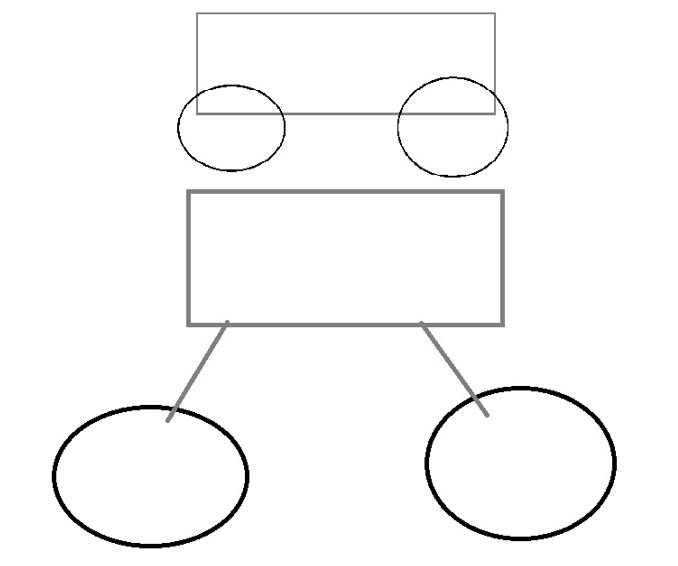
I have a powered up hub with 2x2 motors (+1 extra motor for steering) and I really dont like how close the hub motor axles are to the ground. Can someone help me make some kind of suspension, or not even suspension just extension so that the wheels of my RC car can still be controlled with the motors but they are not directly on the default axles? See the picture below of what it looks like and what I want it to look like:
-
Smartphone steering
MTBRICKS replied to MTBRICKS's topic in LEGO Technic, Mindstorms, Model Team and Scale Modeling
Yes, thank you. Like I said yesterday, the problem was that I didn't switch to controller mode for testing. I didn't even think about it since I was literally using no buttons. -
Smartphone steering
MTBRICKS replied to MTBRICKS's topic in LEGO Technic, Mindstorms, Model Team and Scale Modeling
Interesting. I only used the AB as an example, I'm actually using C for steering, but it's definitely good to know. Luckily the AB motors are included in the move hub itself so I won't have problems with them I believe. -
Smartphone steering
MTBRICKS replied to MTBRICKS's topic in LEGO Technic, Mindstorms, Model Team and Scale Modeling
Thanks for pointing me in the right direction. Also, you may be bugged, but I'm not and AB is working for me now. And do you want to know why it didn't work for me before? Because I was in the code menu, not the controller menu :D Facepalm moment right there. -
Smartphone steering
MTBRICKS replied to MTBRICKS's topic in LEGO Technic, Mindstorms, Model Team and Scale Modeling
Sure, here it is. None of these 2 options do anything.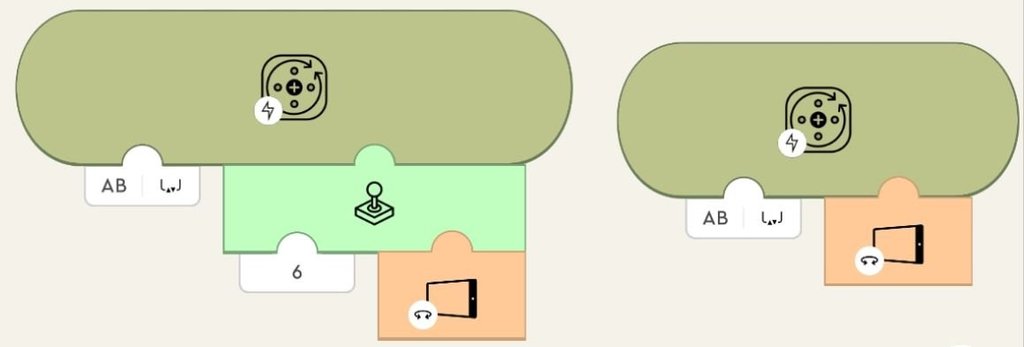
-
Smartphone steering
MTBRICKS replied to MTBRICKS's topic in LEGO Technic, Mindstorms, Model Team and Scale Modeling
Yes, but they're not doing anything. At least not when I replace the joystick code block with one of these. Thanks. So far it hasn't detected any of my devices, will try later with different ones. -
Does anyone know how to make my lego powered up car steer using my phone/tablet? I have found the 2 coding blocks in there, one for vertical tilt and one for horizontal tilt, but neither of them does anything. Do I need any extra sensor for it to work? My car uses the powered up (boost) hub, external powered up motor and sensor of color and distance. And as for bonus question, how do I make the car steer using my playstation gamepad or any other gamepad?
-
Help with lego coding
MTBRICKS replied to MTBRICKS's topic in LEGO Technic, Mindstorms, Model Team and Scale Modeling
Ah, cool, thanks. I thought the last 2 motors to the right were the same thing like the other motors except they had the loop inside them. Now I see the purpose is different too. -
Help with lego coding
MTBRICKS replied to MTBRICKS's topic in LEGO Technic, Mindstorms, Model Team and Scale Modeling
Its not visible. But the link works. And what difference is there between the first thign and the thign with the loop? Is it just the same thing but using the proper block the first time vs using a primitive block and wroking around its limitations? BTW, after my last reply I successfully tested my car using the first technique and had the first proper test run after all these months, so thank you so much again. They should really improve on documentation and tutorials. Or maybe someone with a youtube account can make a video about this? It would be the only one with the current version anyway. -
Help with lego coding
MTBRICKS replied to MTBRICKS's topic in LEGO Technic, Mindstorms, Model Team and Scale Modeling
Cool, thanks. The jpg is still not working, but the link is. Thanks for taking the time. Now everything should be OK.