maehw
-
Posts
41 -
Joined
-
Last visited
Content Type
Profiles
Forums
Gallery
Everything posted by maehw
-
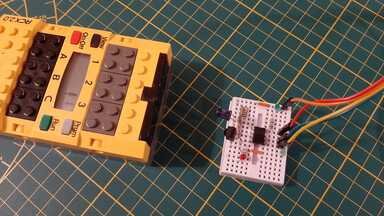
Hi all, I am happy to tell you that BRICK Lines works now... also for reading the inputs. I've committed the @Toastie's slightly modified code to the git repo and added the pinout details here: https://github.com/maehw/BrickLines/tree/main/hardware/serial2parallel_converter I've also fixed the always-serial-write-then-serial-read mechanism in BRICK Lines. I can still observe that the first character sent to the Arduino is not properly "echoed". (Actually ASCII capital letters A, B, C, ... make up for a good binary testing patterns as A = 0x41 which is masked to 0x01, B to 0x02 etc). I am not 100% sure if this is due to sending the first character very soon after the serial connection is opened... or this is a platform-specific problem on my macOS machine. However, not a big deal as I've implemented a workaround for this. Thanks for pointing out that the input can be shorted and nothing will light up in magic smoke. This made it easy for me to test the inputs and make a special cable which I can plug in to simulate a touch sensor. This allowed me to load and execute LEGO Lines program BTEST: ┌ IN ───┬ OUT ──────────────────┐ BRICK Lines ├───┬───┼───┬───┬───┬───┬───┬───┤ │ 7 │ 6 │ 5 │ 4 │ 3 │ 2 │ 1 │ 0 │ ┌─ # ──┬─ LABEL ──────┼───┼───┼───┼───┼───┼───┼───┼───┼───────┐ │ 1 │ light │▒▒▒│▒▒▒│ 0 │ 1 │ 0 │ 0 │ 0 │ 0 │ │ │ 2 │ REPEAT │▒▒▒│▒▒▒│ │ │ │ 3 │ UNTIL │▒▒▒│ 1 │ │ │ │ 4 │ open │▒▒▒│▒▒▒│ 0 │ 0 │ 0 │ 0 │ 0 │ 1 │ 2 │ │ 5 │ close │▒▒▒│▒▒▒│ 0 │ 0 │ 0 │ 0 │ 1 │ 0 │ 2 │ └──────┴──────────────┴───┴───┴───┴───┴───┴───┴───┴───┴───────┘ BTW: I also thought about embedding a LEGO Lines program to BASIC code and/or TClogo code converter into BRICK Lines. Let me know if you'd find this useful. :) I think the cable-motor or cable-lamp connections do not work very reliably. It seems that for some cables (or light bricks?) I need to wobble to get a connection. Especially for motors... the vibrations can loosen existing connections. Any helpful hints if this is normal wear-out, has always been like this or something else? Next logical step would be to re-create models for LINES and play around with them. Do you know which instruction manual I'd have to look at (and check if I have those bricks available here)? Can you tell if the instructions for LINES and TClogo used the same models or different ones? PS: I'd be happy to join a call but I'll be at 38C3 congress in Hamburg during the last week of this year.
-
Thanks for the motivating words, @Toastie! Sounds good, let's give Daniel some more time until February until we start asking how the floppies are doing. That seems to be a good attitude. I am happy to tell that today, I've been able to use my Interface A for the very first time. I've got a DC power supply which does the trick, I've also got an Arduino Nano which still works and some wires. Thanks to your Arduino software and my preparations in BRICK Lines, this was quite a quick starter. (I haven't tried the TC Logo version modified for the serial interface yet. Also no DOSBox-X experiments so far.. I am running BRICK Lines on native Windows, Linux and macOS.) You can find the BRICK Lines software on GitHub: https://github.com/maehw/BrickLines - it's free and open... (MIT license). (It comes with a README.md!) This is where I'd also like to add the Arduino code snippet which does the serial/parallel conversion. As the code is originally yours, I ask you kindly to license it under MIT as well, so that I can add it along with some pinout/hardware wiring info which I added. I also think that the software still has a small bug where I can see issues when applying outputs for the first time. This might not be visible when outputs are set using TC Logo at a rate of 1 kHz but it is in (BRICK) Lines where outputs are only set when specific instructions are executed (all that are not equal to LEGO Lines keywords). I'll try to narrow this down and report with more details. There may also still be a bug in my code and/or wrong assumptions. It already seemed suspicious to me when I tried to talk with the Arduino with a serial terminal and it replied with different characters when I typed in the same character several times... As you may have guessed, I only do have the Interface A (70455, i.e. the later 1987 version) without any cables or interface cards -- only the Arduino Nano as USB-to-parallel-adapter. Sorry, I think I did not make my point clear... or should have rephrased my question. Your code does a `Serial.write()` for every `Serial.read()`. This implies that code running in the machine is always writing outputs before it can read the inputs - because serial is async. This brought up the following questions/assumptions: Does TC Logo write the outputs before it does read the inputs? Always? LEGO BRICK Lines can have instruction that only depend on the inputs (conditions such as `IF` or `UNTIL` or the `COUNT` statement). There's no need in setting the outputs before. Of course, to make this compatible with BRICK Lines, it could adapt the behaviour working with TC Logo and just re-transmit the last-known outputs it has set before to be able to receive the current input levels. (Note: Oops, that's actually what I should have added in the Python code here: https://github.com/maehw/BrickLines/blob/8ba5b78e233419ed867500548f6be82b21c972c7/brick_lines.py#L456 - it seems that I have tested outputs-only programs so far! Probably because I do not have received any sensors so far (neither touch nor opto)! Expected behaviour until I modify the code: the program should get stuck because it's waiting for a receive byte which never comes... and it's a blocking serial receive function.) As this "need to write outputs in order to know the inputs" dependency may be problematic/unintended (see 2), I asked myself if it would also work when the Arduino Nano polled the inputs regularly (or implemented edge detection on the two pins) and sent the data periodically (at the polling rate; or event-based when an edge = level change has been detected). But: this could result in many many bytes being sent from the Arduino to the PC without being read from there... and could overflow a receive buffer until `receive()` is called. But this might not be a problem for "old serial" interfaces which just overwrote a single byte buffer and it was the application's responsibility to read the received input data just fast enough before it got overwritten by more recent data. Not clear if this description let's you get my point... I'd be happy if some of you would like to try BRICK Lines. But it requires the Arduino Nano serial/parallel device as a hack... and so far I am only aware that Toastie has this and somebody else attempted to build another one for themself. So maybe this is a 2 people world only so far.
-
Hi all, a short update from my side! I had contacted both authors Helmut Albrecht and Herbert Hödl. I've gotten a reply from Helmut who seemed very nice and helpful - however, no software files in the end. And Helmut also mentioned that he was in touch with you Thorsten and Evan. Regarding the book and its floppy, I must confess that I had made some wrong assumptions: I was thinking that it contained the MS DOS/IBM PC version of LEGO Lines. But nope, of course not. You had to have LEGO's master flopy along with the license to make copies. So the book's floppy "only" contains programs I guess - still very valuable and I'd like to get access. I found out that the German national library in Frankfurt actually does have the book. It seems that due to legal reasons, they don't want you to copy the floppy contents - or at least you should not get caught when doing so. Well, maybe some day... I haven't contacted TLG about LEGO Lines - as you've written that this likely is a dead end. But: Some weeks ago, I found the precious LEGO Lines floppy for DOS on ebay by a German seller. As at the time I didn't have the equipment to read old 5.25" floppies, I got in touch with Daniel Schmatz (the guy from eitle kinderkram/YouTube mentioned above). Also: it comes with a pile of paper for use in schools (DACTA 950026), so I think Daniel is the best fit with his "museum" near Vienna. In the meantime I do have a 5.25" floppy drive and a Greaseweazle and cabling. I am missing a power supply and some more time, though. Daniel got the floppy and may read it some day using his old equipment - he might be willing to read and archive it by himself or lend it for archiving, we will see. In the meantime, I got myself an Interface A including a ribbon cable, two motors and IIRC opto-sensors and lights should be on their way. I haven't unpacked everything yet even though I am every excited to try things out soon! And I still need an AC or DC power supply - though I probably have one that already fits. Also: I have started to re-create LEGO Lines using Python and am willing to share it - probably another software I've written which the world has _not_ been looking for. It will be able to import Commodore and Apple ][ LEGO lines files and run them (I tried to understand the save file formats and fortunately, they are not that complex). The following screenshot shows my remake "BRICK Lines" on the left and the LEGO Lines software for Commodore (C64, C128, ...) on the right. Interestingly, the Commodore and the Apple ][ versions look completely different and also have different sets of functionalities! Still curious about the DOS version... I might even add functionality to edit your own programs if I or anybody else is willing to use this. I am aiming to use this with a USB/serial converter - so this could run under Windows, Linux and Mac OS! I will base it on @Toastie's Arduino project. But this finally leads me to some questions concerning the serial interface: * The project assumes that before the input ports are read, they are always written. Is this how TC Logo works? Has this been confirmed to be working with other LEGO Interface A software? * How do the emulated serial ports work? Would it also be an option that the Arduino detects edges on the inputs and sends them? Or polls the pins every millisecond and just sends an update? Or would the serial buffer in the emulated DOS machine "overflow" because the software does not read them? Or would it just.. work? * Would the old parallel ports be able to detect edges on the input pins or were they polled (e.g. every millisecond as this is the frequency which as been observed with PWM)? * A general Interface A question: did I get this right that the PC must feed a 5V voltage back into interface A to power LEDs or something or am I mixing things up here?
-
Thanks. Yeah, I anyway contacted Evan. Actually, there's a German book called "Steuern und Regeln mit LEGO Lines und dem LEGO TC Controller" (1989/1990). It's also avaliable on the archive.org website IIRC. I am currently trying to reach out to the authors from back then. It mentions an IBM compatible disk but also that LEGO Lines had only been available for two types of machines — but does not mention which ones (edit: from the details in the chapter: it is Commodore C64 resp. the IBM PC running DOS). This would not match with the info from above. But it's still possible that the software has been posted to other machines. Who knows.
-
Hey all, I am asking myself if anyone has access to LEGO Lines for the IBM PC/DOS? http://lukazi.blogspot.com/2014/07/lego-legos-first-programmable-product.html mentions it with number 9537 as "the IBM-PC version" -- so it must have existed https://archive.org/details/vintagelegorobotics currently lists versions for the BBC Micro, the Apple II, the C64.. but not the IBM PC https://lgauge.com/technic/LEGOInterfaceA/9750(1093).htm is "very much interested in the IBM (DOS) software, if anyone has it for download or even the original diskettes" Is this piece of software really lost? Or maybe only slumbering on floppy disks in attics? Has it really not found its way to the interwebs? I'd really like to see this piece of software running in DOSBox-X as well.
-
This is not a sponsored ad — I just thought that this might interest some of you: >Do you like Lego? Do you like the Apple IIe/IIgs? > >Blocko is an interface card that allows you to control Lego Technics machines with the LOGO programming language, just like we did in elementary school! > >Available in November 2024 > >https://blocko.net
-
Wow, what a nice thread! Thanks everyone for sharing their knowledge, insights, experiments and so on! While reading through the thread and before stumbling across @Toastie's diagrams, I've started to create my own one to get an overview of the hardware+software from that era... as I am more a "visual learning type": This may be wrong (please help me fix it) - and for sure is incomplete. Also special thanks to @evank for publishing videos! Do you have an update on the Philips P2000? And: are you still wanting to sell a hardware bundle? If I find time - and a 9750 - I'd like to use @Toastie's approach with a USB/serial converter + an Arduino acting as serial/parallel converter + DOSBox-X + @alexGS' modified TC Logo version for the serial port (on either Mac OS, Linux or Windows - preferably one of the first two)... and also see if there's other software we can run (or bring it to the browser such as I tried with WebPBrick). Cheers!
-
Thanks @Toastie! It seems that I don't have forum post notifications active. Hey @mar11, thanks for trying! Great that you made an attempt and tried WebPBrick! Have you tried to cover the infrared connection (e.g. by a sheet of paper)? I guess that you are in a "noisy" environment regarding light emissions. You can also play around with distance and angles. The mechanism is not very robust at the moment - however there should be a retry mechanism implemented. But maybe that one is not robust enough and should allow for even more retries. Hope to hear from you again. Cheers! Edit: PS: I had little progress with the USB IR tower. IIRC, you can checkout the git repository and try https://github.com/maehw/WebPBrick/blob/main/src/communication/webusb.htm. It seems that I am losing some data here. I need someone to team up with me as it gets pretty tedious and frustrating working alone on it.
-
8094 Control Centre Mod
maehw replied to Chilly's topic in LEGO Technic, Mindstorms, Model Team and Scale Modeling
Hi all, yeah this thread is pretty old - but why not try to dig out some really old things? I've gotten me a 8094 set and I've built the pen plotter model. It also works with the Mindstorms RCX yellow programmable brick (see my Mastodon/Fediverse account: https://chaos.social/@maehw/112588710501097292). However, I'd also like to lift and lower then pen with a third motor. Unfortunately, the OP's link is broken and the YouTube video in the third post does not really allow me to copy the mechanics. I am more the electronics/ embedded software guy and could need some help with the mechanics. Cheers, Mäh -
Hi all, my last post may have been very technical - maybe too technical? I am happy to announce that I've just released version 0.1.0 of the web-based IDE which I called WebPBrick. I'd be happy to see people explore the IDE here: https://webpbrick.com/ide/ As the project is open source, you can also find the source code on GitHub: https://github.com/maehw/WebPBrick README? Try this one: https://github.com/maehw/WebPBrick/blob/main/CHANGELOG.md CHANGELOG? Try this one: https://github.com/maehw/WebPBrick/blob/main/README.md The LEGO Serial IR Tower should work out of the box - unfortunately, I am still having difficulties with the LEGO USB IR Tower. It would be cool if you could help me spread the news about WebPBrick! Cheers
-
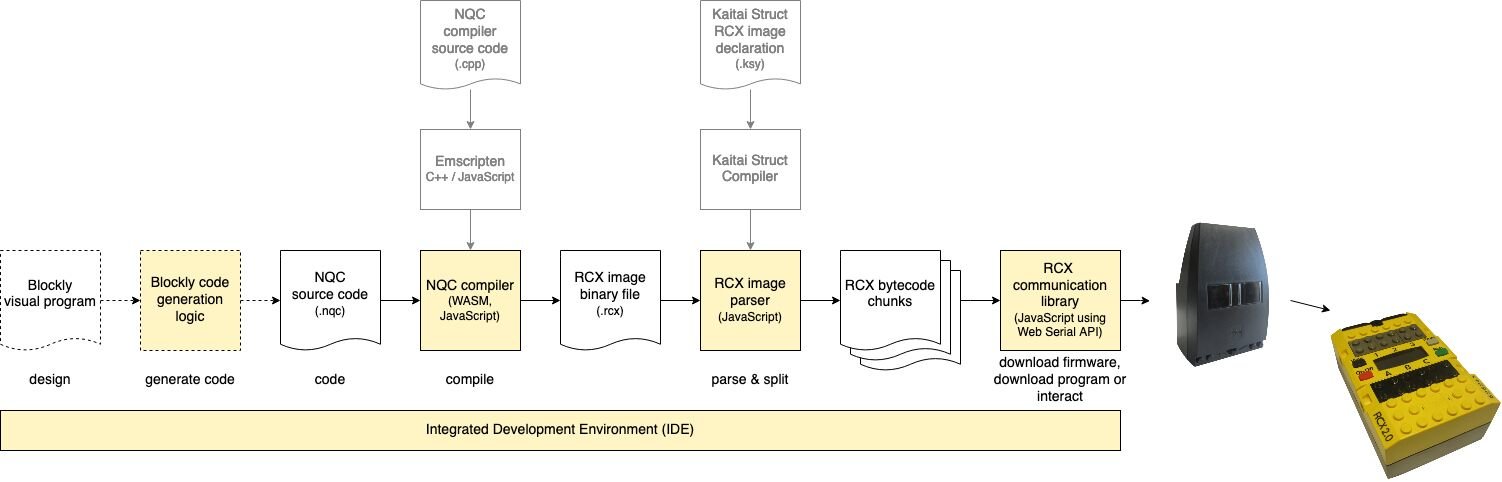
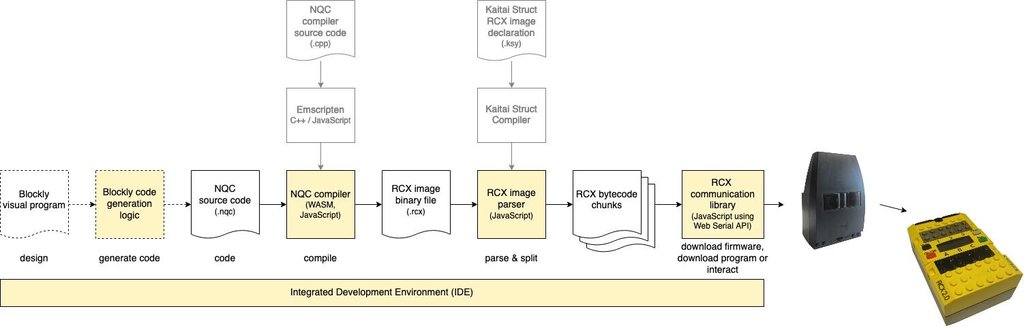
Hi all, I never had an RCX when I was young back then when the first Mindstorms generation was release (1998), but these days I have got me some hardware to play with. I have this idea of reviving the yellow LEGO Mindstorms RCX brick. I've researched the web and found that most people will either set up a Windows Virtual Machine with an old version and run the original LEGO RIS RCX Code IDE or use a Windows Machine and use Bricx Command Center (BricxCC) and program in NQC. However, there seem to be issues with Windows 64-bit drivers for the LEGO USB IR tower. ("That beautiful communication hub for all RCX1.0, 1.5, 2.0, Scout, Spybotics, MicroScout, CodePilot bricks one is truly dead since 64 bit operating systems have taken over." - @Toastie, 2018) People have been using the LEGO serial IR tower instead or done something on their own (e.g. tinkering with hardware and Arduino code to get their own DIY IR tower working). Tired of setting up those Windows machines? Not all people have the knowledge to hack around with things... or try alternatives like running an NQC compiler from Linux or Mac OS. So.. I came up with the idea of... Programming the 1st generation LEGO Mindstorms RIS (yellow RCX brick) from the webbrowser What follows is a technical block diagram of the toolchain to accomplish this. The idea is to compile NQC code in your webbrowser and to download your compiled code to the RCX where it is executed - without any installation. We may even think out of the box and imagine block based programming with Blockly (you know Scratch? you're familiar with Blockly) and generating NQC code... Of course, there are some technical shenanigans required here, but I have proof that the basic concept is feasible: NQC compiler can be compiled as Web Assembly (WASM). See also: https://github.com/maehw/WebNQC (this should run in every modern browser) The actual relevant bytecode chunks from LEGO's proprietary .rcx file format can be extracted. (thanks to NQC's RCX library; also thanks to LEGO for documenting the opcodes) The bytecode chunks (tasks/subroutines, etc) can be downloaded to the RCX brick using a IR serial tower (infrared serial link). This can be accessed with JavaScript in webbrowsers like Chrome, Edge and Opera (unfortunately not Firefox) using the Web Serial API. (thanks for everybody working on that before, especially also BricxCC which allowed me to sniff on the communication; and also LEGO for documenting the protocol) The WebUSB API is a thing, so we may also get this wokring with the LEGO USB IR tower. I've also worked on a low-cost DIY IR serial tower that consists of a an IR LED, an IR receiver, an 8-bit microcontroller, some current-limiting resistors and two LEDs (power, activity), wires + a breadboard (of course, this could be a tiny PCB) + a USB/TTL UART converter (cable) for around 10 € (see thread on Mastodon, continued there): (No 9V battery required, it can be powered by 5V VCC (and probably alternatively also 3.3V) from the USB/serial converter. And only the default driver for the USB/serial converter. You can probably also use this "hardware frontend" part with your Arduino, Raspberry Pi or other embedded hardware... as it simply connects to a TTL serial/UART) I've so far been able to: Program the firmware (.lgo files in Motorola S-record file format (SREC)) using my DIY IR serial tower with the command line utility firmdl3 (disclaimer: all transfers only work reliably using 2400 baud) Program the firmware using my DIY IR serial tower from the webbrowser (Web Serial API) Remote control the RCX from the the webbrowser (using Web Serial API), like playing sounds, reading ROM/firmware versions, ... - everything is possible Run the NQC compiler in the webbrowser - to compile NQC code (.nqc) into RCX image binary files (.rcx) Download programs using my DIY IR serial tower from the webbrowser (again Web Serial API) This should work platform-dependently... on Windows, Linux, Mac OS.. probably also Android (haven't tried to plug the DIY IR tower via an USB OTG cable). If I see interest in any of this, I might keep working on it - and maybe set up a demo website so that you don't have to compile these things locally and run them on a local webserver (which I guess is the current barrier to entry). This looks very technical and ugly, but could get a nice UI. (Take another peak here, here and here.) Feel free to ask, if you'd like to get more insights. You have hacked around with the LEGO RCX in those last 25 years? I'd be keen to know! If you have any cool RCX projects (.rcx files or .nqc files lying around, model build instructions, sensor reverse engineering, ...) that I should try, let me know! (I also have ideas about "decompiling" old .rcx files into NQC code... and optionally Blockly in turn.) You have other ideas? Sure, share them with me!

-
Hi Thorsten, thanks for your reply. The credits for Flipper Zero don't go to me - but I agree, it's a nice gadget to play & hack around with. I've not done very much with it but recording and replaying (or synthesizing and transmitting) RCX commands via the IR interface was a great fit. However, a custom UI instead of the generic remote UI would be really nice, so that you could use Flipper Zero as an RCX remote control. Nice that I could help with "one's complement". The last few days, I was able to bring up my Cybermaster. The hardware still works - or at least started to work after disassembly and reassembly. I've documented my first steps in some toots on Mastodon/ in the Fediverse: https://chaos.social/@maehw/109514018789309270 + https://chaos.social/@maehw/109519738303048254 As mentioned there, a serial connection with the RF tower using 2400 baud, 8 data bits, odd parity, 1 stop bit worked. I am not sure about the command set. But the commands have a 4 byte header (FE 00 00 FF), one command byte (with it's one's complement) plus at least one data byte (with it's one's complement; maybe the number of data bytes depends on the command) and finally a checksum byte (and it's one's complement) - which is quite similar to the RCX IR protocol. Unfortunately, Flipper Zero's RF TRX doesn't go as low as the 27 MHz - so an SDR might come handy here (I don't really have one; at most, I have an "SDR" RX dongle somewhere, not knowing about its frequency range though). The transmitter frequency seems to be at 26.995 MHz (OOK). So I am wondering if 27.000 MHz (OOK) would still work. This band seems pretty much outdated. BTW, I haven't had time to play with VLL protocol in the meantime. Also another sidenote: I've used both Cybermaster's RF tower and mobile unit without antennas, which worked quite OK. Again, BricxCC was really helpful during bring-up. I wrote John an email, if I could get the source code for BricxCC, as https://bricxcc.sourceforge.net mentions that it is licensed under Mozilla Public Licence. Unfortunately, I couldn't find the source code online so I made that email request. Are you aware of any source code?
-
Hi all! I came here by researching programmable brick internals - interestingly exactly one year later after the original post. My current journey started several weeks ago when I got the LEGO 51515 set at an airport. I remembered the times of LEGO Mindstorms RCX (first generation) - and that I never had one. I got in touch with the original LEGO apps and then stumbled across Legoino which gave me control over the Boost hub that's included in the set. (I saw that Cornelius is/was also here.) I then started to buy other programmable bricks from eBay and now I have an NXT, several RCX, a Cybermaster, two Code Pilots and an old Technic Control Center. I then started to remember that my actual journey started back in 1997, where I got a Code Pilot. But I never had an RCX when I was young. Thanks for collecting and sharing the infos. Interesting to see that there are multiple infrared protocols. I've also done some research on the RCX infrared protcol and made my Flipper Zero first replay some signals (that I had previously recorded from an IR tower using BricxCC under Windows). I then wrote a little tool to synthesize the IR signals to be sent by the Flipper Zero which works quite well. I'd also like to write my custom UI plugin for Flipper Zero, first steps of my approach - but without help, I won't continue this effort. I also came up with the idea about a universal programmer - so basically what you've already done with MuLPI. However, I'd do it with a custom PCB. I've wondered if you know anyone who has rebuilt this. I actually came here when I searched for details about the Cybermaster. I got one (unfortunately without any antennas) - it seems to work with radio frequency ~27 MHz. I did not find many details about it - might be AM and seems to be an obsolete remote control band. You can still buy crystals/ crystal pairs, but they are quite expensive. And there don't really seem to be modules readily available that work with that frequency range. Maybe a minimalistic SDR approach might be good here... or a VCO. A small correction to the accumulated information: at least in the RCX protocol not "two's complement" is used but "one's complement" (i.e. all bits are inverted). I'll probably try to program the Code Pilot using the VLL protocol next - do you know if the LED color is relevant? And afterwards test the newer generations step by step and maybe grow my collection of other programmable bricks, too.