Joostv
-
Posts
17 -
Joined
-
Last visited
About Joostv

-
 @Timewhatistime I have added a low-res / minimum size version that is under 5MB at the cost of visible compression in the instructions. Please, let me know if this works.
 -
Thanks! A quicker / easier way to wind up, like pulling a thread as you suggested, would be great. The problem with adding it to the dino itself would be that it adds weight and impacts the balance. Adding a spool to the wind up tool should be feasible, but it would require an additional solution to wind up that spool. Which could be something simple, like rolling it over the floor. That would be worth a try I think. Another solution would be something electric, like a Lego version of @2GodBDGlory's drill solution. Hi @Timewhatistime, I didn't know about this size restriction. I will try and see if some compression can be achieved at the cost of resolution and will upload it as a seperate version. This way you should be able to select the smaller version. Thanks! and thanks for sharing that solution! I will be exhibiting (for the first time) next month and will definitely bring along my cordless drill 😉
-
Thanks, glad you enjoy it 😊 Thanks! Have fun 😊 check the first pages of the instructions for alternative parts of you don't have DIGatron. Thanks 😊 I watched road runner a lot as a kid 😊
-
Thank you both! 😊
-
Thanks for the positive feedback all 😊
-
Thanks 😊 😂 Thanks! Thanks! I learned to announce tests of this one. First succesfull test run in the living room caused a little scream.. Bit too life-like 😉 Thanks 😊
-
Thanks 😊 Thanks 😊 I was pleasantly surprised by the performance of the pull-back motor in this application.
-
This is a little experiment with a pull-back motor. The idea was to do something other than wheels, so I tried legs 😊. I got this to work quite reasonably as you can see in the video. The idea was to have a linkage for the feet that is linear on the front to back movement, but moves in an arc on the back to front movement so the feet can overlap. The overlap is in the center. I have made instructions (free ofcourse) which are here: https://rebrickable.com/mocs/MOC-252160/MejoliDesign/md007-running-dino-experiment You can just scroll through the PDF and see the dino from various angles. This will give you a better idea of how it was built. I managed to include a moving tail, which really helps balancing the dino. With the tail the run was much more stable than without it. I have made attempts to make it a bit prettier, but basically any additions downgrade performance or upset the balance. The sprint is short: 1 tot 1.5 meters. If the power runs out it falls, and power runs out quickly with a pull-back motor. Depending on how well it was positioned at the start and how well you guide the first step the sprint will go straight, curved or it will do something weird like hop on one foot and rolling on its back. I think you can compare it to rolling a coin: it takes a bit of practice. In one way the pull-back motor is the excellent choice for this. The advantage of the pull-back motor is that it will accelarate hard if load is removed. This is precisely what happens in moments when both feet are off the ground. Due to the acceleration of the pull-back motor in this moment, the feet will quickly regain contact with the ground again. You can see these little accelerations in the slow motion part of the video if you look closely. I had quite a lot of fun experimenting with this. So if you want to have a bit of fun building something small that jumps/runs/hops/flaps/... I recommend playing around with a pull-back motor 😉
-
Thanks 😊
-
Thanks! To be honest, if it fails on Lego Ideas I'll likely create a smaller 'inspired' design with a different function (not playing Tic-tac-toe) and share instructions of that. This design has some really hard to source parts, which is something I would change when sharing instructions. Different route, different (self imposed) limitations 😉
-
@Johnny1360 Thank you and have fun 😊
-
@Nalyd997, @Morgoth924, @Kai NRG, @Davidz90, @MKJoshA Thank you 😊 Thanks 😊 And we seem have two hobbies in common then 😉. I was also close to dismissing it when I googled the possible number of game states for Tic-tac-toe (Google came up with an insanely high number). Ofcourse most of those states are ludicrous and moves that no one would ever make. Correct, when the memory is read by the bars which push the and gates into vertical alignment in case the memory is 'high'/true. I think I may need to clarify the two 8-input OR gates: These large horizontal H shapes are the central connections between the input AND gates and the output AND gates. Basically all these AND gates "patch in" to one of the OR gates that connect all keys and fields. Crucially the arms that can block the memory also patch in to these OR gates. Thus the memory bits define which keys trigger which large or gate and what countermove will occur and also where the memory needs to go next. When I built the prototype it turned out that it was very testable during every step of the build. The advantage of that is that a building mistake can be fixed in time. Basically unit testing before integration 😉. The main risk for erroneous operation die to a building mistake is an error in the memory. This is why the memory can be reasonably easily removed. There are indeed a lot more possibilities, but I ran into the LEGO Ideas part limit. That is also why there is no win-lose indication. The signal is available, but the parts are not. If you press two valid keys without turning the dial, then currently there's no guard in place. A guard could be integrated and triggered by an additional OR in the middle in both the two large OR gates. Then be reset by a dial turn. That would require additional parts. A major obstacle to automatically moving the memory on a key stroke press, is that the memory readers must be lifted and this requires a user action. Turning the dial lifts the memory readers. This needs the power of the dial rotation and is supported by two springs (shock breakers) to push the memory readers up for memory reading, but also force them down to correctly read the bits. Central reset of the display was the original idea, but my solution didn't fit. The idea was a slider mechanism, gears had too much play and reset needs precision on all 6 axles. It's a bit finicky. The seperate controls never fail to reset each line. The different rotating directions for display reset is a last minute fix to an error I made. That is easy to fix and I can't image LEGO wouldn't do it if this became a set. A rubber band on the lever is definitely a good idea 👍 even as it is now. And to the last comment: Thanks 😊 and thanks for sharing the suggestions and taking the time to write it all down.
-
@2GodBDGlory, @mdemerchant, @Jeroen Ottens, @Siroco, Thanks for your kind words! 😊 Love those. I have seen a video of one with electric motor going crazy on a divsion by zero once. And thanks 😉 @Elysiumfountain, Thanks and congrats on passing 5K 😊, that house is a beauty! @Toastie Thank you very much! I can't quite describe it, but I'm genuinely touched. Thank you, this made my day 😊
-
Thanks 😊. To be honest about that frame, that solution was born out of necessity: I don't generally use white bricks, and most of my remaining bricks were all different kinds of white (some near yellow 🫣). So I went to a local store and bought a photo frame to cover that up. That looked a lot better. 😉 Thanks! Finding a way to integrate the reset knobs for the display was the main headache. The original plan was to mount them out of sight, but that didn't work out. I was glad I found a way to hide them as decorations. Thanks, and thanks for suggesting it 😊. Pretty much, yes. You can get errors if the machine isn't level (the old secretary with food out desk that is my little building corner definitely isn't level). And strong vibrations (like slamming the table it stands on) can trigger a display (shield/swords) to appear, but that's it. Thanks! And the last quote is actually true for WOPPR and this machine (the best possible outcome for the player is a draw) 😉 @1980SomethingSpaceGuy, @vascolp just wanted to say thank to you as well 😊
-
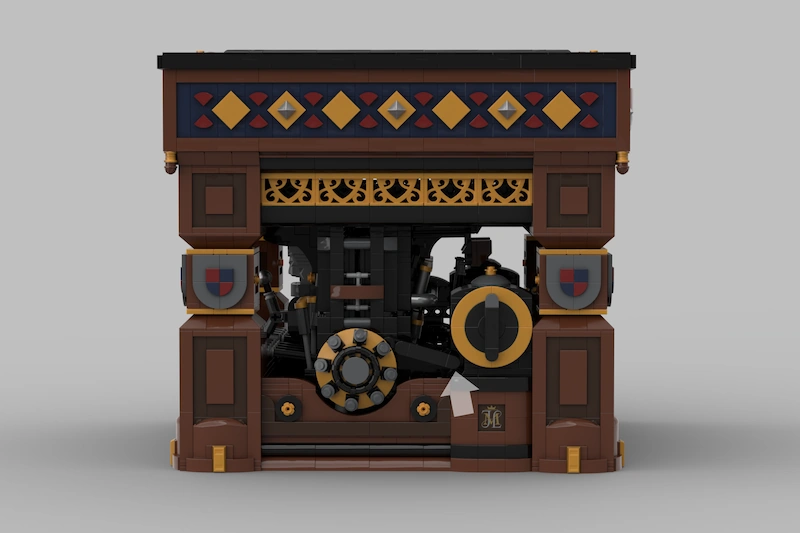
@JunkstyleGio, @blondasek, @N1K0L4, @pleegwat & @allanp Thanks 😊 I'll also answer your questions here: Q: question about lock-ups A: None on the interior, but the tiles that hide the technic holes on the liftarm on the sides (see image) have caught the housing of the dial once. It gave me quite a scare because I thought I had to dissassemble the whole thing. Luckily all I needed to do was press on the tiles and the problem was solved. I haven't looked into preventing this from happening again yet. Q: Question about inspiration A: Every once in a while I have some idea followed by the thought: "Would this be possible with LEGO?". Then I check if somebody did something like that before, and if the answer is 'no', then I get the urge to try and build it. I did magnetically dancing shoes once for pretty much the same reason. In this case there are some very cool builds around that do things with mechanical logic gates or mechanical computing, and some awesome electronic tic-tac-toe playing machines, but not something quite like what I had in mind. Q: Question about 18th century style and if something existed like this. A: The 18th century had lots of automata, these combined mechanisms with a styled exterior and often some animal that was animated by the mechanism. One of the most famous automata was 'the turk', which was a chess playing robot. It was a hoax: A human was hidden inside, but it has all kinds of doors to show the fake internal mechanism. Thanks again 😊