


Cosmik42
-
Posts
267 -
Joined
-
Last visited
Content Type
Profiles
Forums
Gallery
Everything posted by Cosmik42
-
 Absolutely! I just created a separate post with a clear example and a link to the very latest version:
 -
I am working for almost 2 months now on an open automation software called "The Lego Train Project". I thought I would make a separate and clean post to show a very concrete example with full source code. First let's see how it looks like in action: The software used in this demo can be downloaded for free here: https://www.dropbox.com/sh/zl0tqfmthhp48tt/AADeVc1lU5znYSvnlAN8HL-1a?dl=1 Here is how it is setup: I have 4 hubs used in this example: - Red Train Hub with a train motor and a color detector. - Yellow Train Hub with a train motor and color detector. - Switch 1 Hub with a simple motor - Switch 2 Hub with a simple motor and a distance detector. (Note that the dashboard has 2 more hubs but they are not used in this example). Let's dive now into Sequence #1. When you click Start there, it activates the following code: // Desactivate detectors to let the train leave Hub[0].State[0] = 1; // "Switch 2" is routing to large route Hub[2].ActivateSwitchToRight("A"); // Wait for Switch to Activate in Full - Double Cross Switch is pretty slow to switch Wait(1000); // Start "Red Train" Hub[4].SetMotorSpeed("A", 60); // Let the train go through Wait(3000); // "Switch 2" is routing to small route Hub[2].ActivateSwitchToLeft("A"); // Wait for Switch to Activate in Full Wait(1000); // Start "Yellow Train" Hub[1].SetMotorSpeed("A", 60); // Let the train go through Wait(3000); // Prepare "Switch 1" to welcome "Red Train" Hub[0].ActivateSwitchToRight("A"); // Slow Down Yellow Train Hub[4].SetMotorSpeed("A", 50); // Re-activate Events for both trains Hub[0].State[0] = 0; Then we need 2 separate Sensor Events to be able to stop trains. First Event triggers when Yellow Train drive above 'White'. It then execute the following code: // We make sure the trains left. We don't want to stop them too early! if (Hub[0].State[0] == 0) { // Stop Yellow Train Hub[1].Stop("A"); // Switch Prepare Train on the Left Hub[0].ActivateSwitchToLeft("A"); } This codes waits for the initial sequence to be done and if it triggers, stops the Yellow Train and activate the first switch to prepare to welcome the Red Train. Second Event triggers when the Detector of Switch 2 has a train passing in front of it. It then execute the following code: if (Hub[0].State[0] == 0) { // Stop Red Train Hub[4].Stop("A"); } I hope you find this useful!
-
Implemented a real life example
-
BTW - You can write "MainBoard.WriteLine("...."); to log in the program's console. For now there's no clear plan on releasing the source officially, mostly because it is a side project and the code is really ugly :D Thank you @Toastie!
-
The V0.3 link at the top of this thread. Here it is again: https://www.dropbox.com/sh/g32wsw502jwv6oj/AAC0EycS7kgCIluhtVmKt1k3a?dl=1 It should be RampMotorSpeed(Port, Speed, Time), so it will look like this: RampMotorSpeed("A", 70, 1000) where 1000 is in millisecond and is the total time of acceleration/decelaration.
-
Oh good catch! It was hard-coded, now it is properly dynamic and will show the correct version (V0.3.1) I was working on it today! I just added 'Autocomplete'! As soon as you type '.' it will show a dropdown list of valid function like this: Oops! It is fixed in this updated version!
-
@ElectroDiva, really appreciate your offer to lend some hardware to experiment when time will be right. @touthomme, do you have an open API maybe?
-
Thank you! Don't worry, if people do use this software, I have plenty of spare time to push as far as needed.
-
@TheLarry98, insteresting. I just made a debug version for you: https://www.dropbox.com/sh/l2t7pu6ltctp4l7/AAAKs69DVwtLGHCHDZdNaQG6a?dl=1 Can you download it, run it and let me know if the hub shows up? Also, if it does not, can you please click 'Add Program' and then 'Start Program'. Let me know the output then! @Toastie - I agree and this is my plan for now. @ElectroDiva - Unfortunately I do not own this hardware yet, and it starts to be a lot of protocols to follow up on. I still want to make the fundation robust for PuP for now and explore 3rd party protocoles once the automation is clean. Though thanks for pointing out at this other protocol!
-
Happy to read! On my side I have bumped into a limitation. My current bluetooth dongle cannot take more than 5 BLE connected at once. After some research I have found a dongle which people say can host up to 14 BLE simultaneously. I receive it tomorrow so I will keep you updated!
-
Nice design! I have that stuff on its way to me too!
-
I think it's more for people who have already invested in this. Just ordered one SBrick Hub - it's no cheap indeed! :D
-
Buwizz is way too pricy for me unfortunately. 100+ EUR for one motor. However, the sBrick protocol is great! It's all BLE so it fits the philosophy of this software. Ordering some right away.
-
What an amazing idea!
-
I don't own any of these unfortunately. I can look at ordering a couple of those.
-
It's a fair point. I used to be a full time programmer, 'back in the days'. Having only few spare time to work on this, I took the short path which is to work with what I already know. What are the real advantage of xaml beside a more modern UI?
-
This is fixed and already uploaded again on V0.3! I also believe your connection spam should be gone. Please confirm! Also, find below a video that gives a great example using a detector, a switch and 2 trains (@Lok24, this one is public normally) https://www.facebook.com/plugins/video.php?href=https%3A%2F%2Fwww.facebook.com%2F2428195644074254%2Fvideos%2F570905956688893%2F&show_text=0&width=560 Thanks for the kind words @ElectroDiva! Unfortunately no :( I do not know this OS well enough to program on it :( As long as the motor/sensor is plugged to a Powered Up Hub, we can control it.
-
This is wonderful feedback. I think I know how to fix the sensor issue and will work on it today! I am testing a further improved way to connect a Hub to avoid your issue this kind of console spam. As for Color sensor, I did remark this. On my side the behavior is that the hub is found ok, but the sensor itself takes some time to show up. Again, thank you so much for all these precious feedback! We are going to make this little piece of code perfect.
-
Click here and debug should start showing. If it doesn't then your sensor was not properly detected. Can you give me a sample? You seem to experience something that I cannot reproduce, which is great! Oh indeed! This is not implemented. Will put in in my back log!
-
I put distance and color debug at false by default now. But you can turn it back on from the 'View' option in the top bar. Yes! And no need to code. Simply add a Program and then add a 'New Sensor Event'. With this, you can tell a train to stop, accelerate, or many other things, just by picking in combo boxes! I *just* fixed this bug. Sorry about that! Please download from the same URL again!
-
@Giottist - try to plug your old hub that did not use to work. If it is still recognized as a BOOST, you can now reconfigure its type. I have tested this on a WeDo 2.0 motor and on a Train Motor, and 100 remains the max speed for me.
-
Hi everyone, Just a small word to let you know that this very thread was a huge source of inspiration for my latest piece of code: The goal was to produce a software that would encapsulate most of your work but in a way that would be usable by anyone, without the need for any tech knowledge. The Lego Train Project can connect to any Powered Up hubs and allow you to control its port through a simple UI. But you can also program complex scenario and even write custom code in C# without the need for a compiler. Would love your feedback!
-
V0.3 is out! Here is a video that shows the UI improvement: https://www.facebook.com/groups/2311775879052281/permalink/2319137371649465/ Major update with this version: - New UI - Improved Hub Detection - Color In C# Editor - Light Management You can download the latest build here: https://www.dropbox.com/sh/g32wsw502jwv6oj/AAC0EycS7kgCIluhtVmKt1k3a?dl=1 I have a good news @Giottist - in the latest version you can overide the Hub to make it work as a normal train hub, not a BOOST one. Good news @TheLarry98, I detect any Hub regardless of their names now.
-
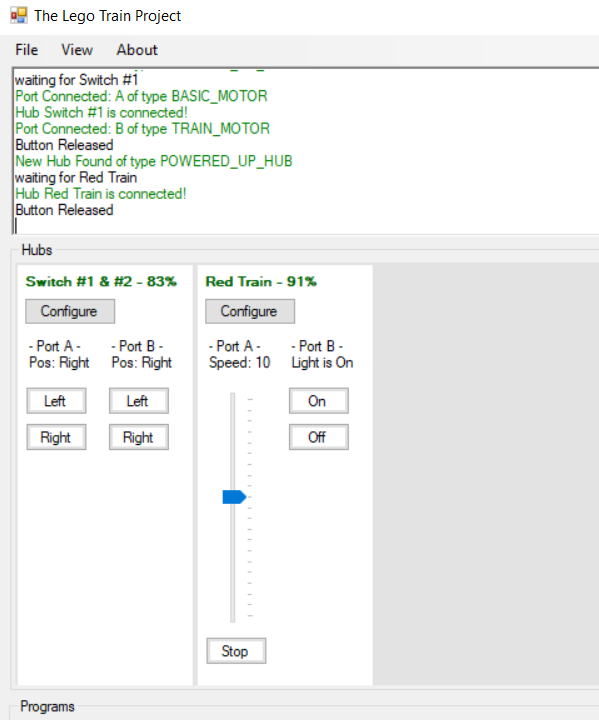
I am completely reworking the UI to be fully generic. You can now configure manually a Hub, and be able to control 4 motors out of a Boost Hub if you wish so! I should have an updated build at the end of the weekend!
-
Well, nevermind, I just figured it out. It was simply port 0x00! => This gets the WeDo 2.0 Distance-Only sensor to start talking WriteMessage(new byte[] { 0x41, 0x00, 0x00, 0x01, 0x00, 0x00, 0x00, 0x01 });