


Walt White
-
Posts
12 -
Joined
-
Last visited
About Walt White

Recent Profile Visitors
683 profile views


-
 Yes. In a new project that successfully connects to an SBrick. BAP does a long wait trying to connect to the EV3, issues the "could not connect" message, and the connection between my laptop and the EV3 is broken.
 -
Latest status of my Bypass Train Project: YouTube video. Details to follow over the summer. Hint: I'll try to simplify the C# code and probably test using WeDo version 1.0 sensors. Walt
-
EV3 Connection Fail Some months ago I noted that I was able to connect an EV3 to BAP but hadn't tested anything. I'm ready to start testing now, and the connection fails. I'm currently running Windows 10 Version 1903 Build 18362.720. I figured out that my Bluetooth connection to the EV3 is running on COM4. The EV3 pairs and connects to the laptop and shows the "<>" icons indicating a successful connection to the laptop. I've added the EV3 MAC address to the BAP list of allowed devices and it failed, and I checked the box to allow BAP to connect to any device and it fails. What's odd is that when I tell BAP to connect via COM4, BAP spends about 15 seconds attempting, and then issues the "Could not connect" error message, and the connection to the EV3 is broken at the same instant. The icon on the EV3 just shows "<". Is anyone else connecting BAP to EV3? Walt
-
Some time ago, I asked about using C# Threads for a two train bypass project that would have been relatively easy with each train following its own Thread. Cosmik42 replied that Threads cannot be used like this in BAP. I figured out a way to do it with one big loop. The Globals and Program code are close to 500 lines total and it is hard to follow. The trick is how to manage the waiting that each train has to do while the other train continues to move and process the colored tiles in the track. I'm sure a more experienced programmer could do it in a more elegant and concise structure, but at least it seems to work. Video and some notes are available.
-
I'm not sure that the battery level is being accurately reported by the hub. I had a train Great Ball Contraption module that needed to cover a section of track at a pretty small window of speeds, between 1100 and 1300 milliseconds. Instead of trying to correlate battery level with speed, I used two sensors to time the train and adjusted the speed as needed. The code below has not been tested. I am using the Stopwatch for another BAP project I'm working on, so I know it works for this purpose. But to give you an idea of how I used it for the GBC project: In the Globals section at the top: public static System.Diagnostics.Stopwatch sw = new System.Diagnostics.Stopwatch(); Then in the Edit Code section, at the top: int startSpeed = 35; // will be adjusted by stopwatch timer. int maximumTime = 1300; // milliseconds. int minimumTime = 1100; // milliseconds. Start the train at that initial speed: Hub[0].SetMotorSpeed("A", startSpeed); As the train passes the first sensor: sw.Start(); As the train passes the second sensor: sw.Stop(); Adjust the speed by 2% if needed: if ( sw.ElapsedMilliseconds > maximumTime ) // train is going too slow. { Hub[0].SetMotorSpeed("A", Hub[0].GetSpeed("A") + 2); } if ( sw.ElapsedMilliseconds < minimumTime ); // train is going too fast. { Hub[0].SetMotorSpeed("A", Hub[0].GetSpeed("A") - 2); } sw.Reset(); Obviously, this only works if you have sensors available.
-
@Lok24 --> Sorry for the confusion. I was just talking in general about the Mindstorms environment and the PU environment. I connected an EV3 to BAP but haven't done any testing of that combination yet. @Nivst --> My Great Ball Contraption loading station has a very tight spacing so the train can only be six studs wide right now. If needed, I can try to reconfigure the GBC loading and unloading stations to allow mounting the sensor on the side of the train.
-
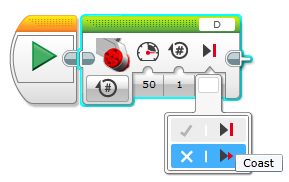
I'm curious how you implement the Stop mode. I've just been using the two modes from the EV3-G blocks:
-
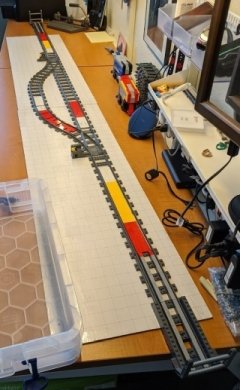
@AlecDGeneric -- thanks for the details. Other builder's experiences is exactly what I need to help me troubleshoot this situation. It sounds like we are both using the same basic approach, now that I'm trying to use one big program loop for both trains instead of using separate code segments for each train. Your physical layout sounds very close to mine and we are both using sensors on the trains, not next to segments of the track like many others seem to be using. Using sensors next to the track would require three hubs (one at each endpoint and one at at the bypass segments) in addition to the hubs on each train. We are trying to do this all with two hubs - one on each train. I'm using the same color (red) at each end and at each bypass segment, and keeping track of location in the C# code by cycling through a known pattern of the four locations in a known order. You described "a substantial lag between the train going over the tiles and reacting to it, sometimes up to a full track length". For the same reason, I've had to run the train at 35% as the "fast" speed because setting the speed to zero doesn't stop the train. It coasts for quite some time. It's not like the EV3 motors that have a "brake" mode to really stop when you tell it to stop. I've attached a picture of my test track. Other things I have noted, some of which are specific to my project, some of which might help other builders: BAP version 1.5 lists three recommended colors for the 88007 color sensor: red, white, and yellow. No other colors or lack of color can be reliably read at this time. I haven't tried reading the logs that other builders mention, and my test track is put away for a few days, but I will start looking at the logs when I resume work on this. Another interesting feature of the 88007 color sensor is that once it reads one of the three recommended colors, it will continue to report that color until it sees one of the other two recommended colors. So I have white tiles at the transition to "open track". Adjacent red and white tiles will trigger a YELLOW reading from the sensor when directly over the transition, especially if the train is moving slow. I'm now counting consecutive readings and only acting on a color if it is read four or more times in a row. I have the same condition with my Mindstorms EV3 train and EV3 color sensor. The sensor reads my desktop (imitation wood grain) testing area as YELLOW when it's reading the open track, so I'm using white panels under the track. At the convention, there will be dark tablecloth under all the track. My Great Ball Contraption (GBC) endpoints require a relatively slow train when loading and unloading at the endpoints, so as the train approaches either endpoint I use yellow to trigger "slow down", then red to trigger stop and reverse in slow speed. As the train sees the yellow segment while leaving the endpoints, the code tells the train to speed up. At one of the endpoints the train needs to wait two seconds for the GBC ball loading process. I'm not giving up yet. Hopefully by the end of this week I'll get time to try a single large program loop to make this project work.
-
Hi Cosmik42, Thanks for the quick reply and clarification about Threads. My concern about just having each train wait something like 4 seconds is that after ten minutes or so they would inevitably get out of sync due to different battery levels and thus speeds in the two trains. I hope to have something that can run for many hours at a convention like Bricks By The Bay in Santa Clara, California, where I show my GBC stuff. I'll keep trying things. Your BAP is too cool to abandon. Thanks, again for creating it. Walt
-
My project is to duplicate the bypass utility in the Akiyuki Great Ball Contraption module "Mechanical Train". Basically, two trains share a single out-and-back segment of track. Midway between the endpoints is a section of tracks with two switches creating two bypass segments. Each train takes the left segment and stops and waits for the other train to occupy the other segment, after which both trains proceed. I'm using the 88009 Powered Up hubs, 88011 train motors, and 88007 color sensors which see colored tiles in the track to identify where to stop at the endpoints and in each bypass segment. I think that each train needs its own program to read the colors and react independently from the other train. Then when each train stops and waits at a bypass segment, it needs to update a global variable that the other train can read. When both trains see that the other train has updated its global variable, they proceed and reset their variables until the next cycle. Experimenting with the BAP Global Functions & Code, it looks like its meant for constants and functions, not variables. Program code sequences inherit whatever is in the Globals and can modify any variables, but another code sequence cannot see those changes. I found a solution using Threads. For demonstration, within the Globals, a Boolean variable is set to false. Also within Globals, two functions are defined. When launched from a Code Sequence, the Red() function reads the global variable value when launched, waits five seconds and updates the variable to true. The Blue() function reads that initial value when launched, waits ten seconds and reads the variable and finds that the value has changed. So two independent threads can share a global variable. I know to ensure that only one thread updates a variable. Here's the demonstration code in Global Functions & Code: public static bool updatedByRed = false; public static void Red() { MainBoard.WriteLine("Red thinks updatedByRed at launch = " + updatedByRed.ToString()); for (int k = 0; k < 5; k++) { MainBoard.WriteLine("Red...." + k.ToString()); System.Threading.Thread.Sleep(1000); } updatedByRed = true; MainBoard.WriteLine("Red thinks updatedByRed after 5 seconds = " + updatedByRed.ToString()); } public static void Blue() { MainBoard.WriteLine("Blue thinks updatedByRed at launch = " + updatedByRed.ToString()); for (int j = 0; j < 10; j++) { MainBoard.WriteLine("Blue..." + j.ToString()); System.Threading.Thread.Sleep(1000); } MainBoard.WriteLine("Blue thinks updatedByRed after 10 seconds = " + updatedByRed.ToString()); } Here's the Sequence Code that does the work: System.Threading.Thread redThread = new System.Threading.Thread(Red); System.Threading.Thread blueThread = new System.Threading.Thread(Blue); redThread.Start(); blueThread.Start(); The results are encouraging: Red thinks updatedByRed at launch = False Blue thinks updatedByRed at launch = False Red....0 Blue...0 Red....1 Blue...1 Red....2 Blue...2 Red....3 Blue...3 Red....4 Blue...4 Red thinks updatedByRed after 5 seconds = True Blue...5 Blue...6 Blue...7 Blue...8 Blue...9 Blue thinks updatedByRed after 10 seconds = True The problem occurs when trying to use a Hub in one of the threads. With Hub[0] connected and recognized by BAP and shown in the Objects section of the Global code, adding a line to the thread (other code not shown for brevity): public static void Blue() { Hub[0].SetMotorSpeed("A", 50); } generates: Compilation Error (CS0118): 'LegoTrainProject.Hub' is a 'type' but is used like a 'variable' Compilation Error (CS1998): This async method lacks 'await' operators and will run synchronously. Consider using the 'await' operator to await non-blocking API calls, or 'await Task.Run(...)' to do CPU-bound work on a background thread. Rewriting the Global function to accept a Hub parameter: public static void parameterBlue(Hub train) { train.SetMotorSpeed("A", 50); } compiles OK, but running the modified Sequence code: System.Threading.Thread redThread = new System.Threading.Thread(Red); System.Threading.Thread blueThread = new System.Threading.Thread(parameterBlue); redThread.Start(); blueThread.Start(Hub[0]); Run Code results: Compiling failed. Error (CS1502): The best overloaded method match for 'System.Threading.Thread.Thread(System.Threading.ThreadStart)' has some invalid arguments Error (CS1503): Argument 1: cannot convert from 'method group' to 'System.Threading.ThreadStart' Experimenting with different ways to pass a parameter to a thread: var blueThread = new System.Threading.Thread(new System.Threading.ParameterizedThreadStart(parameterBlue)); blueThread.Start(Hub[0]); Run Code results: Compiling failed. Error (CS0123): No overload for 'parameterBlue' matches delegate 'System.Threading.ParameterizedThreadStart' So now I'm out of ideas on how to make this work. Any suggestions will be appreciated.
-
That doesn't stop the code from running. Same with the Stop All Hubs button. It doesn't stop the code from running. It looks like you have to click the "X" to the right of the Sequence #1 line to get the code to stop. Lots of experimenting to do here!
-
This is an amazing program! The more I play with it the more I remember the theme from Lord Of The Rings. This could have been posted earlier; there's a lot of pages to read. But I keep thinking: One Ring to rule them all, One Ring to find them, One Ring to bring them all, and in the darkness bind them. I've been working slowly and have got some simple things to work, so thought I would share a simple example for other beginners. It's an exercise with the LEGO 88009 Hub and the 88007 Color & Distance Sensor on port B When the hub appears in BAP, click Configure and change the Trigger Cooldown to 100. There's no "Apply" button; just close the dialog box. Click Add Program. Click Add Sequence. Click Edit Code. Note at the top of the Code Editor for Objects: it lists the hubs with a name and a number. For beginner programmers, just use the Hub[n] in your program that corresponds to the name you gave your hub. Enter this code in the editing area: while (true) { MainBoard.WriteLine(Hub[0].GetDistance("B").ToString()); Wait(100); } Click the Run Code button. Place an object in front of the distance sensor. In the upper text area you should see the distance of that object from the sensor in centimeters. It tops out at 15 centimeters. Click File --> Save Current Proect As and give it a name like Distance Demo. The only way I've found to stop the program within BAP is to click the "X" to the right of the Configure button. That action shuts down the hub. Pushing the start button on the hub reactivates the program and the distances are displayed again. I want to use BAP at a convention and need to be able to isolate problems without interfering with other running programs so I'm going to be experimenting with that process. Hope this helps. Walt