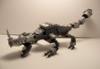
reptiman Posted September 12, 2012 Posted September 12, 2012 Hydrakes are deadly, nomadic wyverns. They can be found in jungles, deserts, mountains, marshes, the tundra, and even diving in oceans. They are notorious for hunting prey to near extinction before moving on to a new location to hunt. They are capable of firing a powerful, concentrated water beam with enough force to punch straight through the strongest of armor. Hydrake by reptiman1, on Flickr Hydrake by reptiman1, on Flickr Hydrake- The Nomad Wyvern by reptiman1, on Flickr This was originally made for my project on CUUSOO, but I wanted to get some feedback here. Comments and criticism are both appreciated. Have a nice day! Quote
purpleparadox Posted September 12, 2012 Posted September 12, 2012 (edited) Sweet! This one looks a lot like a Creator set that TLG would release. My only suggestion is to maybe add something, some kind of detailing, to the upper section of the wings. (By the way, I'm supporting this. ) Edited September 12, 2012 by purpleparadox Quote
Mark of Falworth Posted September 12, 2012 Posted September 12, 2012 Lots to like about this!! I would change the 4 x 6 tan plates to blue though. Still, a very cool MOC! Quote
soccerkid6 Posted September 12, 2012 Posted September 12, 2012 The head looks great I agree with Mark about the tan plates. I like the feet design as well Quote
DeanFS Posted September 12, 2012 Posted September 12, 2012 Wonderful - I really like your usage of wedge plate shapes to achieve the wing effect. The scaly head/nostril area is very innovative. Overall the shape is great. I do have some specific recommendations: -The ball hinges should be black. They would then add a layer of depth to the dragon's frame whilst the dark bley seems out of place. -The eyes should stick out a bit more. Different colors or tile/jumper formats might achieve this effectively. The eyes might be more convincing with some kind of contrast (i.e. 2 different colors to give the eyes life) -The ridges on his/her (its?) back are great, and I would recommend extending them out a bit more, perhaps tapering as they go away from the torso. -The tan on the wings add a very unique marking, but their corners are jarring. Perhaps adding 1 layer of blue plate wedge above would make this a smoother transition, whilst adding depth to the wings. -The tail is a bit out of character for a dragon. Some kind of minor changes to make it sharper could really enhance this area (i.e. a 4x1 blue tile with an inverted slope on each side of the tail end). This is one of the better MOCs I've looked at today, keep us updated about the project you use it in! Quote
reptiman Posted September 13, 2012 Author Posted September 13, 2012 Sweet! This one looks a lot like a Creator set that TLG would release. My only suggestion is to maybe add something, some kind of detailing, to the upper section of the wings. (By the way, I'm supporting this. ) Thanks! I am going for an official TLG vibe in most of my MOC's so I am glad you got that impression. I agree that the wings probably could use some more detailing. I am glad to hear you enjoyed the MOC and are supporting the project. Lots to like about this!! I would change the 4 x 6 tan plates to blue though. Still, a very cool MOC! That means quite a bit coming from a MOC expert. Do the tan plates look out of place? I'll have to get around to changing them. The head looks great I agree with Mark about the tan plates. I like the feet design as well Thanks! I actually started off the whole dragon with the head. I was looking for a unique design and I came up with those overlapping plates. I am glad you like the MOC! Wonderful - I really like your usage of wedge plate shapes to achieve the wing effect. The scaly head/nostril area is very innovative. Overall the shape is great. I do have some specific recommendations: -The ball hinges should be black. They would then add a layer of depth to the dragon's frame whilst the dark bley seems out of place. -The eyes should stick out a bit more. Different colors or tile/jumper formats might achieve this effectively. The eyes might be more convincing with some kind of contrast (i.e. 2 different colors to give the eyes life) -The ridges on his/her (its?) back are great, and I would recommend extending them out a bit more, perhaps tapering as they go away from the torso. -The tan on the wings add a very unique marking, but their corners are jarring. Perhaps adding 1 layer of blue plate wedge above would make this a smoother transition, whilst adding depth to the wings. -The tail is a bit out of character for a dragon. Some kind of minor changes to make it sharper could really enhance this area (i.e. a 4x1 blue tile with an inverted slope on each side of the tail end). This is one of the better MOCs I've looked at today, keep us updated about the project you use it in! First of all, thanks for all the wonderful feedback! - I know the bley looks odd and mess up the color scheme a bit. My parts limitations prevent me from fixing that right now though. - I agree the eyes look odd and artificial. I didn't really come up with a way to fix it though. I'll play around with some more designs though. - I definitely agree here. I wanted to have them continue down it's back and tail, but I ran out of the 1x2 plates with stud in center. - Removing them altogether has been a suggestion too. I will mess around with the wings some more and see what I can come up with. - The unique tail was a intentional design choice on my part. I wanted to give it an almost semi-aquatic feel to it, so I kind of disagree here. Thanks for all of the great feedback. You have no idea how much I appreciate suggestions like this. It only helps me improve. I am glad you enjoyed the MOC! Thanks for the feedback everyone! I hope you all enjoyed the MOC. Quote
Ferrik Posted September 13, 2012 Posted September 13, 2012 This looks excellent, I like how you used fangs on the wings. I would like to see a bit more detail though to make this MOC so much better. Quote
Duce Posted September 13, 2012 Posted September 13, 2012 Needs some Vikings trying to stab and tie ti down with ropes :) But great looking build regardless. Quote

Recommended Posts
Join the conversation
You can post now and register later. If you have an account, sign in now to post with your account.